

When we started building the agentic experience, we believed one thing firmly: agents are going to 100x the scale of creative pipelines. We did not expect the proof to arrive this fast:
Within a week of the Comfy MCP beta post, people were running thousands of workflows a day through it. This is the real proof that workflows are fully adopted in production.
We learned that agents batch by nature — You don't ask an agent for one image. You ask for a set. And here are the improvements we made over the past week to enable scalable workflows.
Improvements for Batch Generation
New tools built for running many workflows at once. Submit, monitor, and collect a whole set — each step saving significant time and tokens.
submit_batch— up to 50 jobs in one call. Mix partner models and your own workflows in the same batch. Onebatch_idcomes back.get_batch_status— The state of every job in one call.readymeans the file is genuinely fetchable, not just that the job claims it’s done.get_batch_output— Collect every ready output in one call, with a single download command for the whole set.
The batch_id is durable. Submit now, close the laptop, collect tomorrow in a fresh session.
Everything else since launch
Comfy is live on OpenClaw: clawhub.ai/comfy-org/skills/comfy. Official skill published under the @comfy-org publisher org.
One command for any OpenClaw user:
openclaw skills install @comfy-org/comfyMore models: Seedance 2.0 Mini and Seedream 5.0, plus additional audio and 3D modes. Your agent is always up to date on the latest models and related template workflows. Seedance 2.5 is dropping in MCP on day 1 as well, just like all the other Comfy products.
App Mode, properly: Turn a saved workflow into an app: choose the inputs, choose the outputs, hide the graph, share the URL. Your teammate runs it without ever seeing a node. It now handles subgraph widgets and video loaders — and the link actually opens.
Use Cases in Real Production
We gathered some real use cases after talking to users and regenerated the assets ourselves for the showcases.
Persona shoots — one face × N scenes. The biggest cluster by far. An identity-locked character, shot across dozens of 9:16 phone-style scenes. Virtual influencers and UGC pipelines are one of the most common things being built on the MCP today.
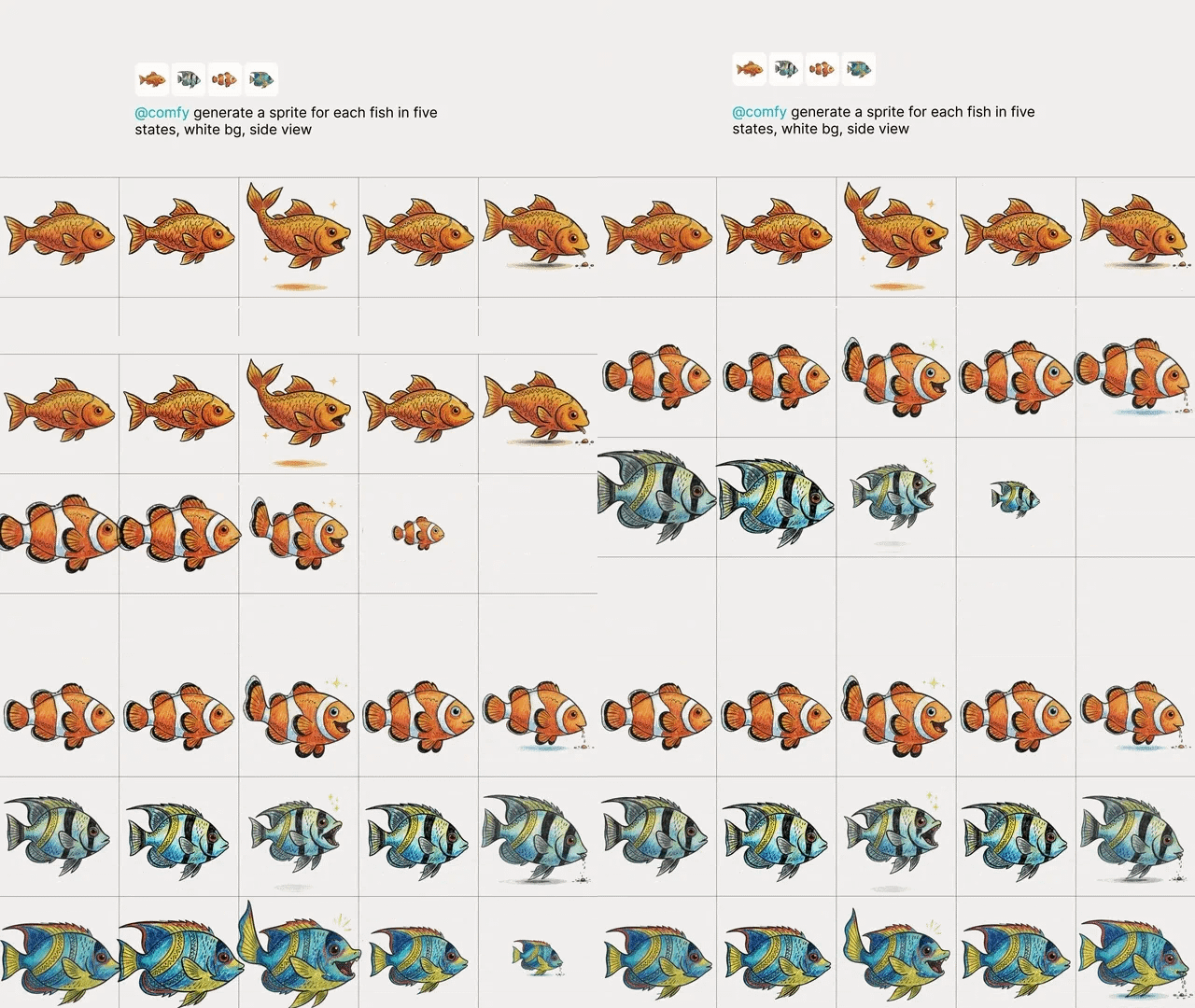
Asset matrices — characters × states. The cleanest batch story we’ve seen. A game developer ran four fish — koi, clownfish, angelfish, reef — across five animation states each: swim, hover, celebrate, dizzy, peck. White background, side view. Twenty sprites, one batch.
Prompt fans — one scene × N variants. Ad and commercial production. Fintech tap-to-pay POV shots, EV charging at golden hour, home-care nurse scenes. Same scene, ten takes, pick one.
Get Started in 5 minutes
Create a Comfy account at cloud.comfy.org or in the desktop app.
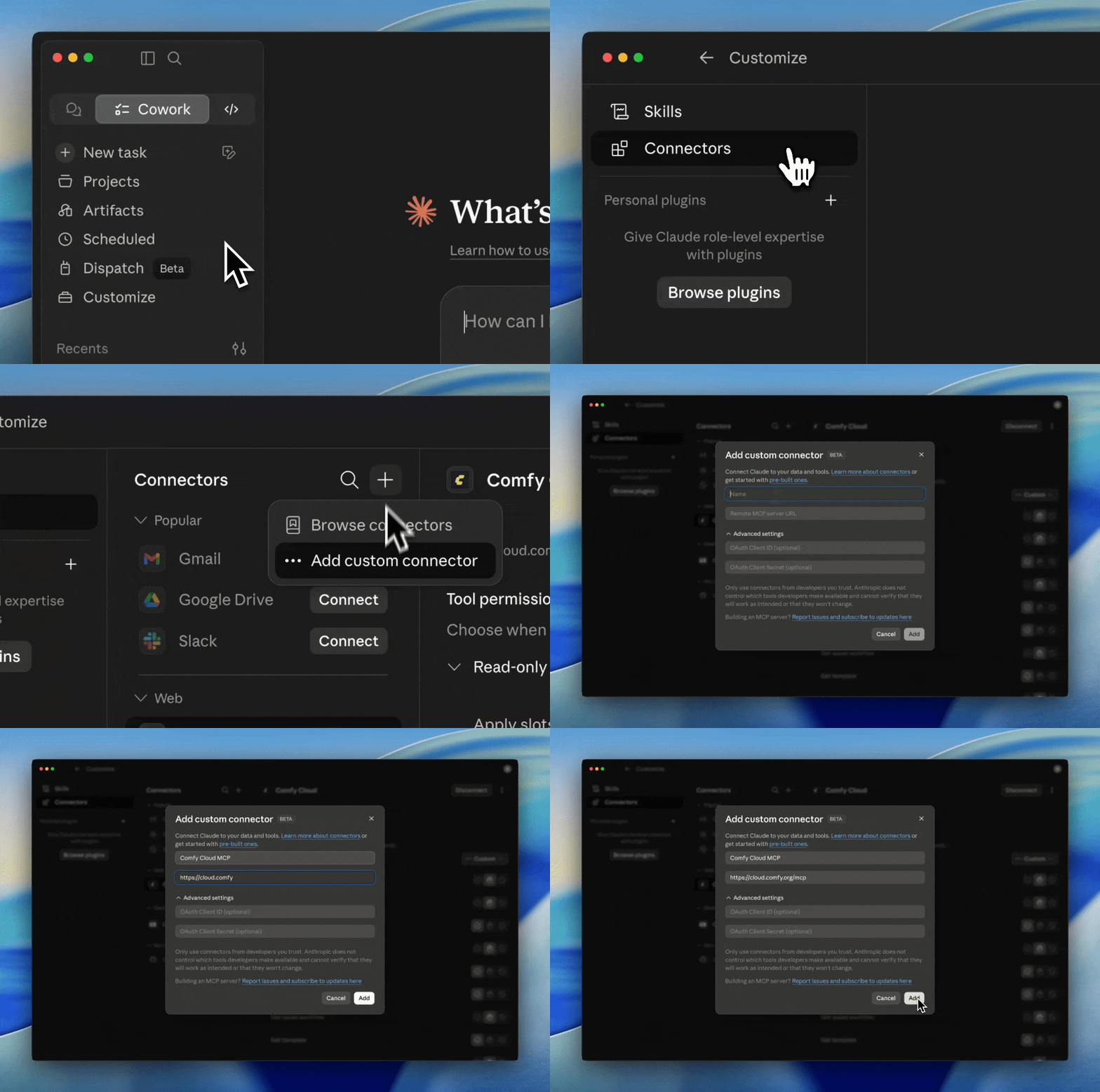
For Claude Desktop, add Comfy as a Custom Connector.
For any other agent, send it the docs: “Agent, please help me install Comfy MCP: https://docs.comfy.org/agent-tools/mcp“
Tips from Beta Users
Most of the creative work involves asset uploading and downloading. When choosing an agent, we would recommend one with greater access to local directories and file systems. For example, we recommend Claude Code over Claude Chat to better handle these.
If you want to see the workflow for all generations, you can try going to cloud.comfy.org and dragging the generated images or videos directly back into the canvas; it should show the workflow.
When you don’t know how to refer to a workflow for your agent, try to share it as a URL.
Feedback
Feedback survey: https://links.comfy.org/cloudmcpbeta
Discord: the #comfy-mcp-and-cli channel — https://discord.gg/xWJn6nhE3R
As always, enjoy creating! Plus, local MCP is coming soon.
Me waiting for the local mcp 💀
Great breakdown of a practical production use case for scaling ComfyUI workflows.