


How do you make generative AI work at architectural scale? Moment Factory used ComfyUI to fundamentally transform how they handle early concept, look development, and design exploration for architectural projection mapping.
Before ComfyUI, this phase was slower, more abstract, and carried greater risk. After ComfyUI, it became faster, more concrete, and spatially grounded from the start.
Before ComfyUI: Slow iteration, abstract decisions, late risk
Early concept and look development traditionally relied on:
Static sketches
Reference decks
Moodboards
Abstract discussions about intent
For architectural projection mapping, this creates a problem. You do not really know if something works until it is projected at scale. Seams, pixel density, spatial drift, and composition issues usually reveal themselves later in the process, when changes have a massive impact on production.
Traditionally, this means:
Fewer directions explored
Longer back-and-forth cycles
Creative decisions made without spatial proof
Risk pushed downstream into production
What changed with ComfyUI
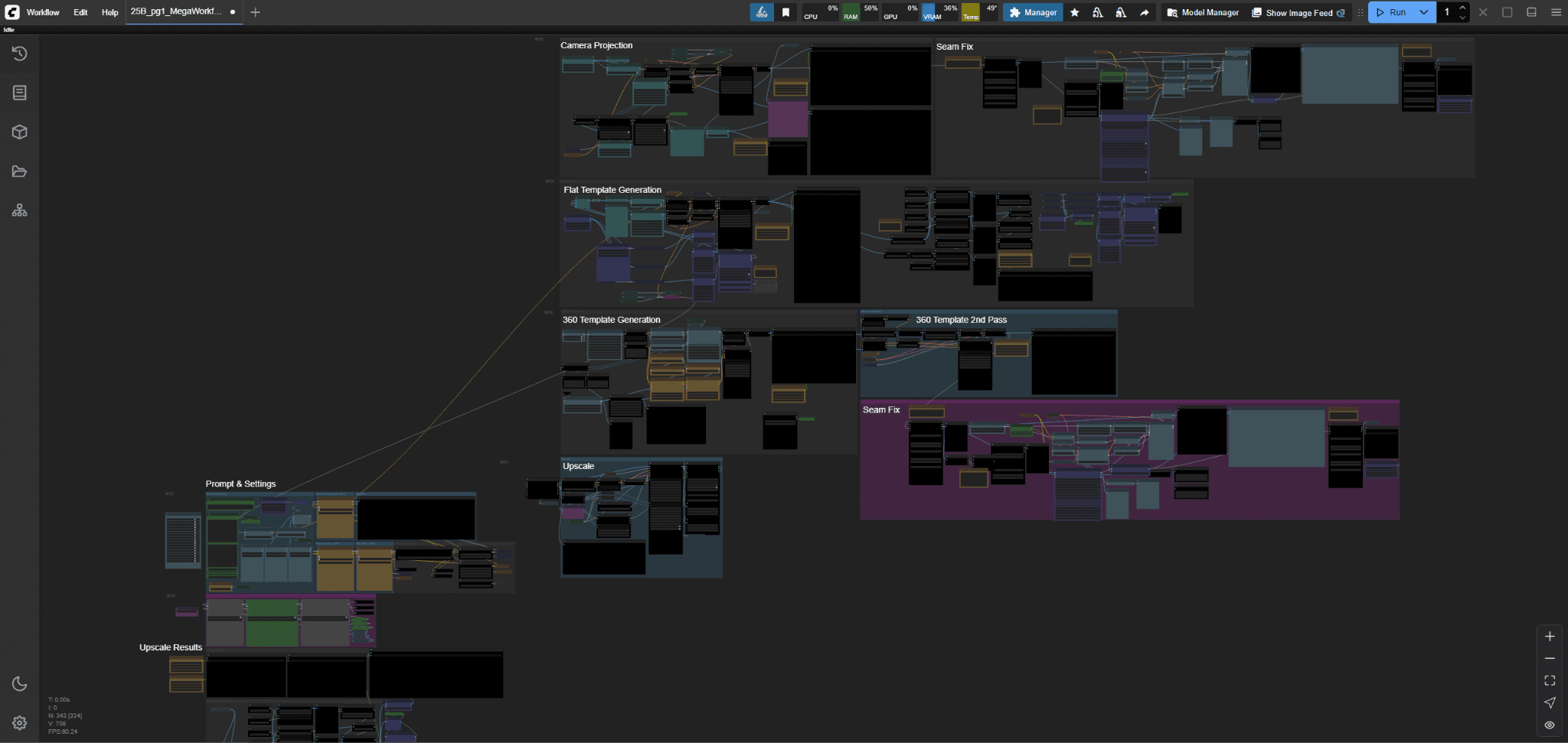
Moment Factory built a custom ComfyUI workflow and used it to enhance and accelerate large parts of early concept sketching, look-dev exploration, and part of the design phase.
They did not just generate images. They changed how decisions were made.
1. Iteration stopped being the bottleneck
ComfyUI, transformed the iteration process, making it faster, sharper, and more intentional
Grounded in real production parameters, they explored:
Over 20 main artistic directions
20 to 40 iterations per direction
Styles ranging from hyper-realism to illustrative engraving
The studio used batching and parameter tweaks to move quickly, while intentionally stress-testing the system to understand its limits.
“With any GenAI tool, it’s easy to over-iterate, to believe the best result is always one click away. Imposing real production constraints, whether financial or time-based, was essential to ensure these explorations remained meaningful and truly impacted our pipelines” - Guillaume Borgomano | Senior Multimedia Directory & Innovation Creative Lead @ Moment Factory
That volume of exploration would not have been realistic in their previous workflow.
2. Concept work moved from days to hours
The biggest acceleration happened early.
What would normally involve days of back-and-forth between static concepts and reference decks could happen within a few hours.
They generated intentionally low-resolution outputs around 2K, reviewed them quickly, and even generated new variations live on site. Those outputs could be checked directly in the media server timeline minutes later.
This low-resolution stage was not about polish. It was about validation and decision-making. What would normally involve days could happen within a few hours.
That shift alone changed the pace of the entire project.
3. Spatial credibility came first, not last
A major reason this worked is that every generation was already spatially constrained.
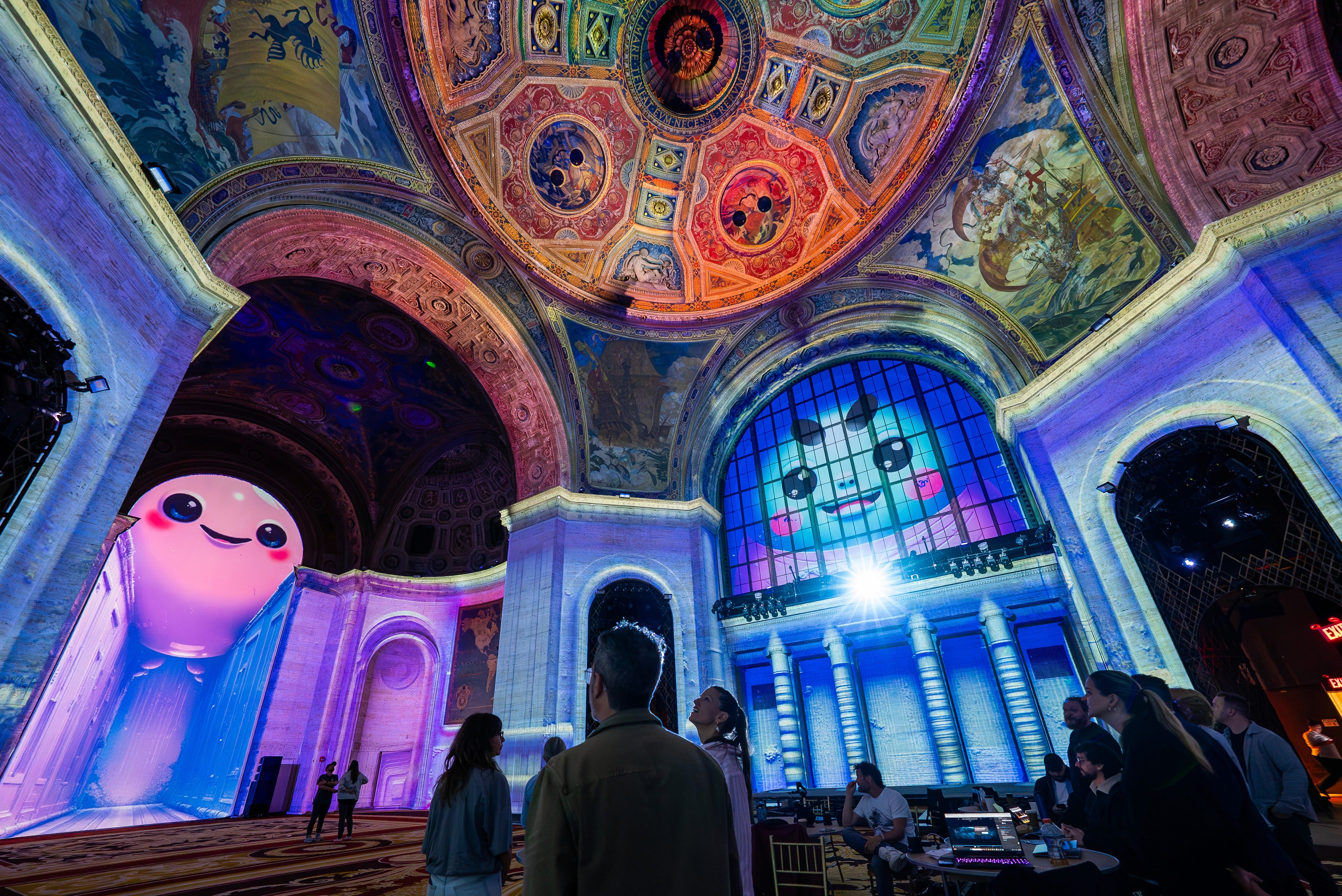
Moment Factory built the entire workflow around architectural surface templates, so outputs were pre-mapped from the start. The pipeline supported multiple template types in parallel, including flat UVs, 360 layouts, and camera-projection setups.
ControlNet injected structural information from those templates directly into the diffusion process, enforcing scale, layout, and spatial logic early.
Because of this, visuals were already spatially credible during the concept phase. That made alignment easier.
Abstract intent turned into shared reference points. The team could react to something grounded instead of imagining how it might look later.
4. Approval no longer meant starting over
Once a direction was approved, the workflow did not reset.
They could:
Inpaint specific regions
Preserve composition
Upscale selected outputs to 18K in ~20 minutes
This completely changed how fast ideas moved from concept to projection-ready content.
Previously, approval often meant rebuilding work. With ComfyUI, approval meant pushing forward.
5. Fewer people, better collaboration
Once the system was stable, one main artist operated inside ComfyUI.
Around that setup, two additional team members were continuously involved in art direction, prompt tuning, selection, and alignment discussions.
They had to define a new working methodology to keep creative intent at the center, but in practice, ComfyUI functioned as a shared exploration tool, not a solo technical setup.
6. The moment it became undeniable
Within Moment Factory’s innovation team, it felt like a breakthrough early on, the level of malleability and control simply wasn’t achievable with more rigid tools. But the real turning point came during a in-situ live demo, held at 25 Broadway. Late in the process, Moment Factory swapped the surface template and reran the entire pipeline without re-authoring a single asset. The composition held & the spatial logic remained intact. The content dropped straight into the media server timeline.
The room went quiet.
In that moment, it stopped being a promising experiment and became a shared realization. People weren’t asking what if anymore, they were asking how to prompt, and in what other context it could apply.
That’s when it became undeniable: this wasn’t just a powerful tool for R&D. It was a shift in how teams across Moment Factory could think, iterate, and produce.
Why ComfyUI Was Critical at Architectural Scale
Moment Factory had been exploring diffusion-based workflows for projection mapping for years.
The ambition was clear: use generative systems not just for images, but as structured spatial material within complex, large-scale environments.
What architectural scale demanded, however, was not just image generation. It required:
• Precise control over spatial conditioning
• The ability to inject UV layouts and depth constraints directly into inference
• Rapid template switching without breaking composition
• Iterative refinement without rebuilding from scratch
• A pipeline that could evolve as constraints changed.
This level of structural malleability was essential.
ComfyUI’s node-based architecture allowed the team to design and reshape the workflow itself, not just the outputs. Conditioning logic, batching strategies, template inputs, and upscaling stages could be reconfigured as the project evolved.
Rather than adapting the project to fit a tool, the tool could be adapted to fit the architecture.
At that point, it became clear: achieving reliable architectural-scale generative workflows required a system flexible enough to be re-authored alongside the creative process. ComfyUI provided that flexibility.
The takeaway
ComfyUI did not make the creative decisions.
The vision stayed human. The constraints were architectural, and the expectations were production-level from the start.
What ComfyUI brought to the table was structural flexibility. It allowed the workflow itself to be shaped and reshaped as the project evolved. Spatial inputs could be injected directly into inference. Templates could be swapped without collapsing the composition. Refinements could happen without rebuilding entire directions.
Generative systems stopped behaving like black boxes and started behaving like controllable material. Spatial logic was embedded early, and scaling to architectural resolution became a managed step rather than a gamble.
The impact was not just speed. Decisions could be validated earlier, directly against geometry and projection conditions. Spatial alignment became part of concept development instead of a late-stage correction. That shift reduced uncertainty before entering production.
In that sense, ComfyUI did more than accelerate exploration. It made architectural-scale generative workflows structurally viable within real production constraints.
Moment Factory Contributors :
Guillaume Borgomano | Senior Multimedia Directory & Innovation Creative Lead
Conner Tozier | Lead Motion Designer & Generative AI Lead
Read more on this topic : https://momentfactory.com/blogs/lab/exploration-at-25-broadway
18k upscale? Where have I been, what have I missed?