

The brief for the Comfy × MiniMax H3 Sync Sound Challenge may have looked simple, but was a challenge to do well: make something in ComfyUI with MiniMax H3 where the audio and the video come out of the same generation. If the character claps, the clap has to be born in the same pass as the hands. No music bed laid on afterwards, no dubbing, though reference audio was welcomed.
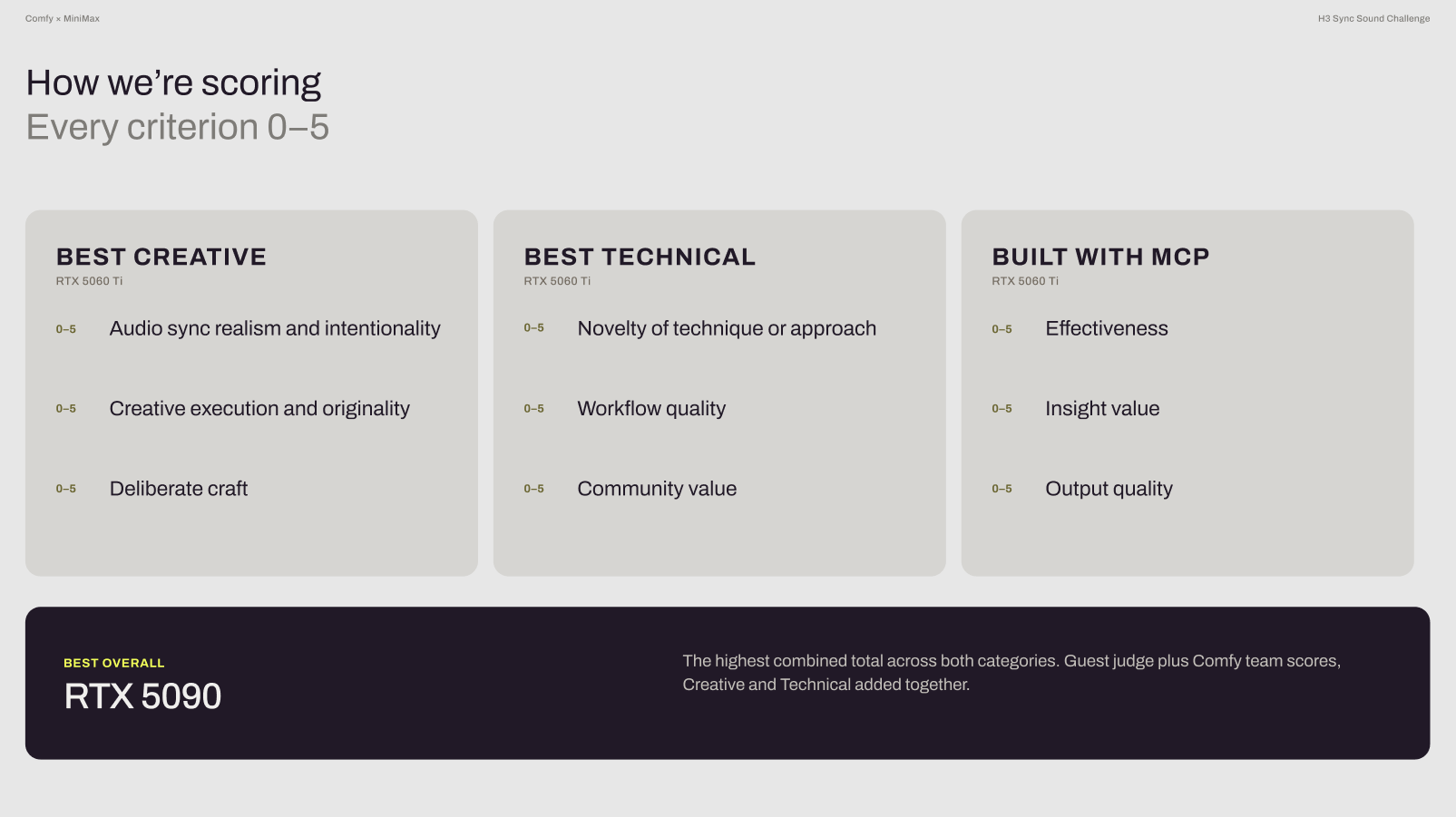
Entries opened August 20 and closed September 1. Eight creative technologists at Comfy scored every submission on two rubrics, Best Creative and Best Technical, then the top five in each category went in front of our guest judges on the September 3 livestream: POM (Banodoco founder), Emma Catnip (animation director and AV artist), and Yachimat (animation and manga artist). Their scores were averaged and added to the Comfy team’s, and a fourth title, Built with MCP, was judged on its own track.

Watch the livestream replay here.
Huge thanks to MiniMax for making an open-weight model our community loves, to our three guest judges, and to everyone who spent their last week of August fighting with reference audio! Here’s how it landed.
The Winners
Best Overall · “Spin Cycle” by Visual Frisson 🇺🇸
Prize: RTX 5090 32G
A laundromat, a woman in a puffer vest, and a rhythm built entirely out of machines. Visual Frisson generated a large volume of H3 clips using their own recorded audio as the reference for every pass, then cut the results together like a stomp video, so every thud and cycle on screen is sound that H3 produced with the picture rather than something added later.
It was the only entry to post a perfect 15/15 from the Comfy team in both categories, and the Comfy MCP was used to drive much of its process. Combined with the guest judges’ scores, it finished with the highest total in the challenge.
From the artist: “Always have fun and learn something new competing in contests like this, keep them coming.”
Watch → vimeo.com/1223207725
Workflow → Google Drive
Follow → instagram.com/visualfrisson
Best Creative · “Every Sound Leaves a Mark” by toki 🇯🇵
Prize: RTX 5060 Ti
A small clay creature that changes into something new every time it hears a sound (glass, wool, ice, porcelain), until by the time it gets home it can’t move anymore. All of the audio came out of H3 alongside the video on every shot, with nothing layered on afterwards. Our judges praised the fine details of toki’s work, saying it “gave them chills” on the first transformation, has a lot of commercial appeal, and feels really delicate and crafted.
The judges scored it highest of any Creative finalist, and the repository is unusually generous: it includes the eight API graphs that actually ran, the same eight converted to UI format with annotations, a process log with every measurement, and the scripts that produced those numbers. toki is also clear about scope, noting that MCP drove the finishing pass, not the original shot generation.
Watch → youtube.com/watch?v=Rv5HOgCac-w
Workflow → github.com/tokimwc/every-sound-leaves-a-mark
Follow → @toki_mwc
Best Technical · “Sonder Editor / References” by SonderSaid 🇲🇽
Prize: RTX 5060 Ti
SonderSaid didn’t just build a workflow, they built the tooling around it. The entry runs on custom nodes of their own design, wired into a reference-driven H3 pipeline that scored a clean 15/15 on novelty, workflow quality, and community value from the Comfy team, and the highest guest judge average in the Technical bracket. Notably, the work includes an entire custom node pack just to do the editing and the reference work, praised as “a whole new UI” to good to keep secret. While SonderSaid’s work takes the prize for best technical, our guest judges also noted how much they loved the storytelling, suspense, and element of surprise.
Watch → youtu.be/n-NdAQk7I8A
Workflow → Hugging Face
Follow → @SonderSaid
Built with MCP Bonus · “Two Prisoners” by Jay Choi 🇰🇷
Prize: RTX 5060 Ti
The Built with MCP bonus went to whoever used the Comfy MCP most effectively to make something visually and technically compelling, and Jay Choi used it end to end. Working locally on an RTX 5090 with Hermes Agent driving ComfyUI through the MCP, they trained a LoRA, built their own orchestration on top, and by their own account spent most of the time setting up and tuning the MCP layer itself. The film that came out the other side, two blindfolded prisoners in a rain-dark cell, is a long way from “prompt and run.”
From the artist: “Thanks for the challenge! I learned more than I ever could in the past two weeks!”
Watch → youtu.be/FlK0dDZdzRU
Workflow → Google Drive
Follow → @permafrost_2021 · @jaychoirenderender
The Finalists
Ten entries made it to the livestream. Six of them didn’t take a title, and every one of them is worth your time.
Best Creative — Top 5
“Neb” by Nebsh 🇫🇷
Hand-drawn energy and a graffiti wall that says the title, built locally in ComfyUI. Nebsh’s note to us was three words and a heart, which felt about right. Our guest judges praised Nebsh’s work for its mixed-media feel, harking back to MTV days, and impressive work syncing with the paper sounds. Under the hood, Nebsh’s workflow chained vtogether eight segments with no visible drift between them- cited as “very clean work” by our judges.
Watch → YouTube
Workflow → Google Drive
Follow → @nebsh83
“The Museum of Impossible Sounds” by scvxzf 🇨🇳
A perfect 15/15 from the Comfy team on the Creative rubric, and one of the entries that ran the Comfy MCP end to end! Noted by our judges, H3 is very good at the kind of sound effects showcased in scvxzf’s work rather than talking or singing, and they chose exactly the right concept for the challenge.
Watch → YouTube
Workflow → Google Drive · github.com/scvxzf1
Follow → youtube.com/@钛龙白口-j6d
“Mister Meow” by sorryaboutyourcats 🇺🇸
Two reference photos of Mumu the cat, a stack of WAVs fed in as reference audio to steer each generation, and glitch texture added in the edit. If the name rings a bell, sorryaboutyourcats also makes the game mow meow. Judges said “I could watch this forever,” had it stuck in their heads, and noted impressive capabilities from H3 nailing lipsync for cats, and not just humans.
Watch → youtube.com/watch?v=AxUu8rabC6M
Workflow → Google Drive
Follow → @sorryaboutyourcats

“Rings of Sorrow” by Slop Diffusion 🇪🇸
A 5/5 on both audio sync and creative execution, and a reminder of what patience looks like: the generation took two hours and thirty-five minutes on a 5090. Our judges praised Slop Diffusion’s work for its storytelling, noting they were curious to see where the story would go next. One judge noted, “it’s slop by name, but not by nature.”
Watch → Reddit
Workflow → Google Drive
Follow → @SlopDiffusion
Best Technical — Top 5
“Feel It” by Aïe Aïe Aïe! 🇫🇷
Came at the brief backwards: we asked for audio-driven video and they told the story of a young deaf woman who invents a world where she makes the music. The score is Aïe Aïe Aïe’s own composition, fed into H3 as reference stems (the clap track went in on its own and the gorilla claps exactly in time). Judges praised the work for its captivating story, clever inversion of the challenge’s brief, the display of H3’s strengths by way of the musicians’ physical expressions intensifying along with the song, and the bridging of the real world. The artist learned the final frame’s sign language on YouTube, filmed themself signing, and used this as a video reference.
Under the hood, Claude drove ComfyUI through the MCP to design a two-pass H3REF system that generates at full resolution twice as fast and reaches 13–15 second shots where the stock workflow runs out of memory, plus a preview node that shows the video while it’s still sampling. All of it is MIT-licensed, custom nodes included.
Watch → youtube.com/watch?v=S0v1pWN4Hq4
Workflow → github.com/Hyper-Neural/h3-sync-two-phase
Follow → @AïeAïeAïe
“Brand New Day” by RareTutor 🇮🇳
One of the cleanest graphs we opened: latent upscale, a model preview override, and an optional video-extend group, laid out so you can follow it cold. RareTutor’s YouTube is full of tutorials if you want to learn from them directly!
Judges highlighted RareTutor’s workflow, noting “there are many tips in here to copy,” such as using the latent upscale as a previewer so you can kill a bad run before sinking more time in.
Watch → youtube.com/watch?v=TNhJI8dzaVA
Workflow → Google Drive
Follow → @raretutor_
“Comfy Cora ft. Max Mini: Back to the Basics” by wur7el 🇦🇹
A short music video with self-imposed constraints: no external resources, everything generated in a single workflow, no custom node packs. The result is well annotated and approachable, the kind of graph a new user could open and reasonably figure out, and it posted the highest Creative score of any Technical finalist. Judges praised the work for being a standout example of how to make a music video where the characters are actually rapping the parts in the song.
Watch → wamms.at
Workflow → sync-sound-challenge.json
Follow → wamms.at
About the Comfy MCP
Several finalists and many entrants leaned on the Comfy MCP, which lets an agent (Claude, Cursor, Codex, Hermes, whichever you use) drive ComfyUI in plain language.
The feature entrants used most was the hardware check: it looks at the GPU you actually have, reads the nodes and models already on your disk, and tells you which version of a model is worth running before you spend time or credits. It works on both local ComfyUI and Comfy Cloud from one account.
It’s open source at github.com/Comfy-Org/comfy-mcp, and the fastest way to start is to tell your agent: “help me set up the local Comfy MCP connection.”
Every entry
Placed or not, every submission is in the challenge megathread on r/comfyui with its workflow attached. Go open a few. Some of the most interesting audio work in the pool never made the top ten, and there are entries in there in Chinese, Japanese, and French that deserve more eyes than they got.
The livestream recording, including the judges’ live reactions, is on YouTube.
Thanks for making this one a smash! #ComfyH3