


Today, we are introducing Comfy MCP in public beta: Connect your existing workflows with the power of the Comfy Ecosystem across Claude, Codex, Hermes, Cursor, and all the other agents. This is the first MCP built for production pipelines.
Turn your Claude into a creative artist.
The MCP provides your agent with access to all the latest image, video, 3D, and audio models, as well as hundreds of popular ComfyUI workflows. We auto-update the best-practice workflows, so your agent always knows what is up to date.
Want to try 20 product-placement images for your brand ads? Character design for your game art? Script-to-shot ideation at scale? Do it with your agent today!
Today, everyone gets their ComfyUI expert.
If you heard about ComfyUI but never tried it because it’s complicated, that’s not the case anymore. Today, your agent learns all these for you:
Build, edit, and run workflows
Search models, nodes, and template workflows
Save and re-run workflows
Read and execute shared workflow URLs
Retrieve the workflows of all MCP generations in the app
Everything is now in natural language. No nodes, no download, no GPU, no node graphs if you don’t want them.
Built for reproducibility and teamwork
Share a workflow URL with anyone, including the agents.
If your team members don’t want to learn the workflow you built, now their agents can run it too.
Edit the same pipeline with your agent. Every generation is 100% reproducible, made for long-term projects, not one-off generations.

Example use cases for production work
“Take one hero sneaker shot and generate 20 ad variants in 4 aspect ratios for Meta Advantage+.”
“Read my saved product-shot workflow and re-run it on these 5 new images.”
“Turn three storyboard frames into a cinematic clip — then explain the workflow so my teammate can reuse it.”
“Generate a consistent character across 12 card-art poses.”
Get started in 5 minutes
Comfy MCP connects your Comfy account to your agents, so you need a Comfy account to get started.
Create a Comfy account at cloud.comfy.org or in the desktop app.
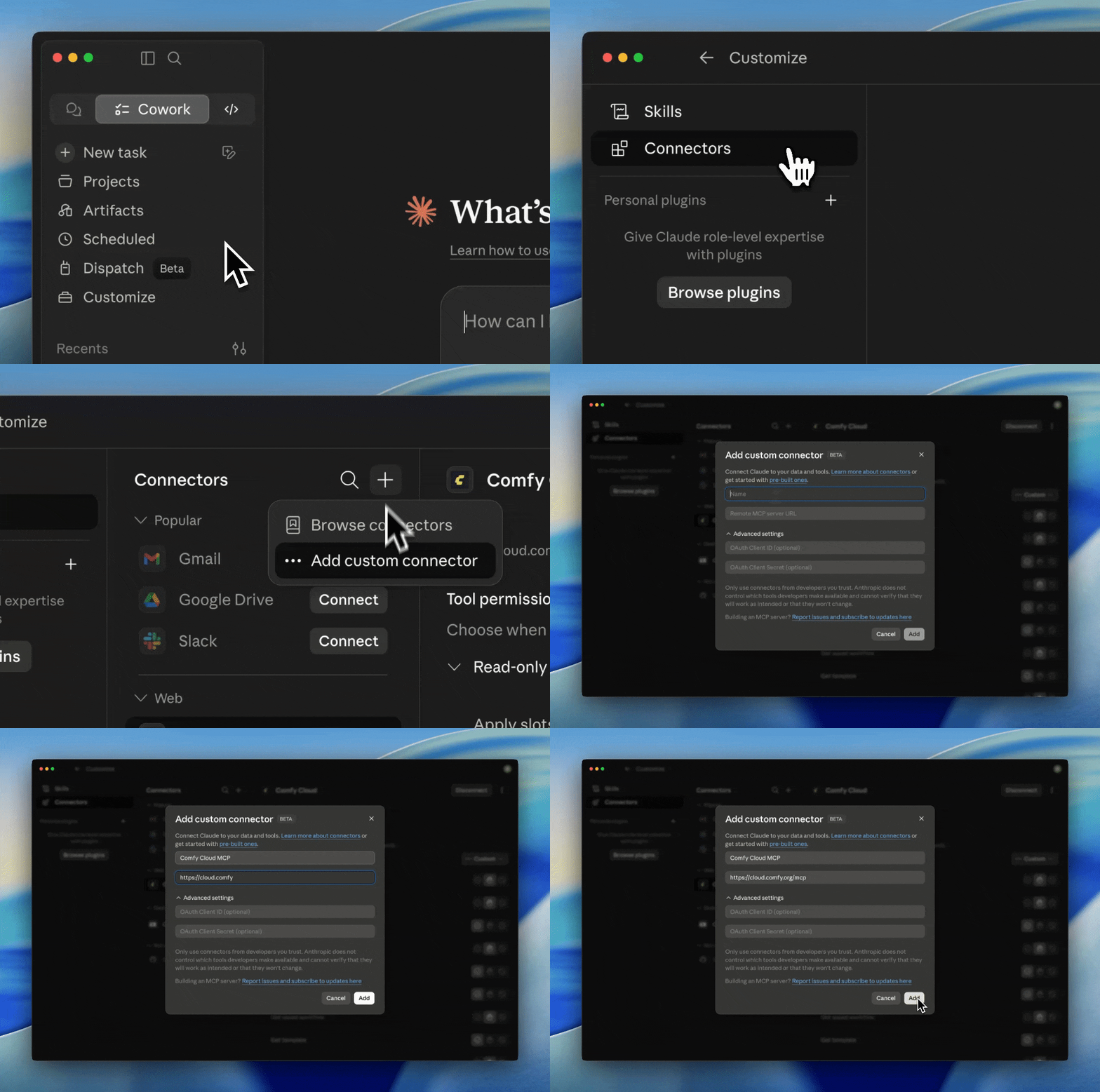
For Claude Desktop, please add a Custom Connector as shown below.
For other agent clients, please send the docs to your agent:
“Agent, please help me install Comfy MCP: https://docs.comfy.org/agent-tools/cloud”
More resources: CLI and Skills
For more information about the MCP, please refer to our documentation on installation, the list of tools, and multiple auth methods: https://docs.comfy.org/agent-tools/cloud
To expand your agentic experience, we are also enabling Comfy CLI in Beta. You can also find more details in the docs.
We are also starting a Comfy Skill repository for our creative technologist team and community members to share their Comfy skills. You are always welcome to contribute and comment! https://github.com/Comfy-Org/comfy-skills/
Feedback
The MCP is still in beta. Please try it out, stress test it, and tell us what works and what doesn't. We are genuinely grateful for all kinds of feedback.
Feedback Survey: https://links.comfy.org/cloudmcpbeta
Discord channel: Join the #comfy-mcp-and-cli channel in our Discord https://discord.gg/xWJn6nhE3R
As always, enjoy creating!
Congrats, awesome to see this ship. We clearly landed on the same idea from opposite ends: you took it to the cloud, I built it offline-first. ComfyUI - Agent Kit gives the same full natural-language control, where the agent assembles the entire workflow, generates images, video, and audio, and even builds custom nodes (V3 API) for your exact task, across Claude Code, Codex, Gemini, and Qwen. It ships near-daily and folds in community fixes and workarounds by hand, often before they reach an official build, so the agent routes around broken paths before it builds. The twist: it runs entirely on your own machine, private and NDA-safe, and still reaches online models when you want. Cloud for scale, local for control.
github.com/SlavaSexton/ComfyUI-Agent-Kit
This is fantastic! My Hermes agent had this in the newsletter it makes for me and was already using it to create the newsletter graphics! Well played, Comfy!
Way better than having some aggregate site constantly wobbling direct control of the pipelines we all rely on for actual work.