


We are glad to share the recent major change to the ComfyUI interface: Node 2.0. This update transitions our node system from LiteGraph.js Canvas rendering to a Vue-based architecture, unlocking faster iteration and richer interactions.
Over the last few days, we’ve seen a ton of passionate discussion about Nodes 2.0. Thank you all for the feedback! We really do read everything, the frustrations, the bug reports, the memes, all of it. And we wanted to share a bit more about why we’re doing this, what we believe in, and what we’re fixing right now.
Why Nodes 2.0? More Power, Not Less
Canvas2D + Litegraph have taken us incredibly far, but they’re hitting real limits. They restrict what we can do in the UI, how custom nodes can interact, how advanced models can expose controls, and what the next generation of workflows will even look like.
Nodes 2.0 (and the upcoming Linear Mode) are the foundation we need for the next chapter, which enables:
Faster feature development
Expandable nodes & dynamic widgets
Better components and interaction patterns
What We’re Fixing Right Now
We’re actively working on improvements and want to be transparent about where we are as Node 2.0 continues to mature.
Legacy Canvas Isn’t Going Anywhere
If Nodes 2.0 isn’t working for you yet, you can switch back in the settings. We’re not removing it. No forced migration.
Custom Node Support Is a Priority
ComfyUI wouldn’t be ComfyUI without the ecosystem. Huge shoutout to the rgthree author and every custom node dev out there, you’re the heartbeat of this community.
We’re working directly with authors to make sure their nodes can migrate smoothly and nothing people rely on gets left behind.
Fixing the Rough Edges
You’ve pointed out what’s missing, and we’re on it:
Restoring Stop/Cancel (already fixed) and Clear Queue buttons
Fixing Seed controls
Bringing Search back to dropdown menus
Optimizing the performance
More small-but-important UX tweaks
These will roll out quickly.
How to Enable Node 2.0 or Switch Back
Visit cloud.comfy.org or update to the nightly version (Desktop coming soon)
Click “Try it out” on the top banner when you launch ComfyUI
You can always switch back: click the ComfyUI logo to open the menu, then toggle “Nodes 2.0” to switch back.
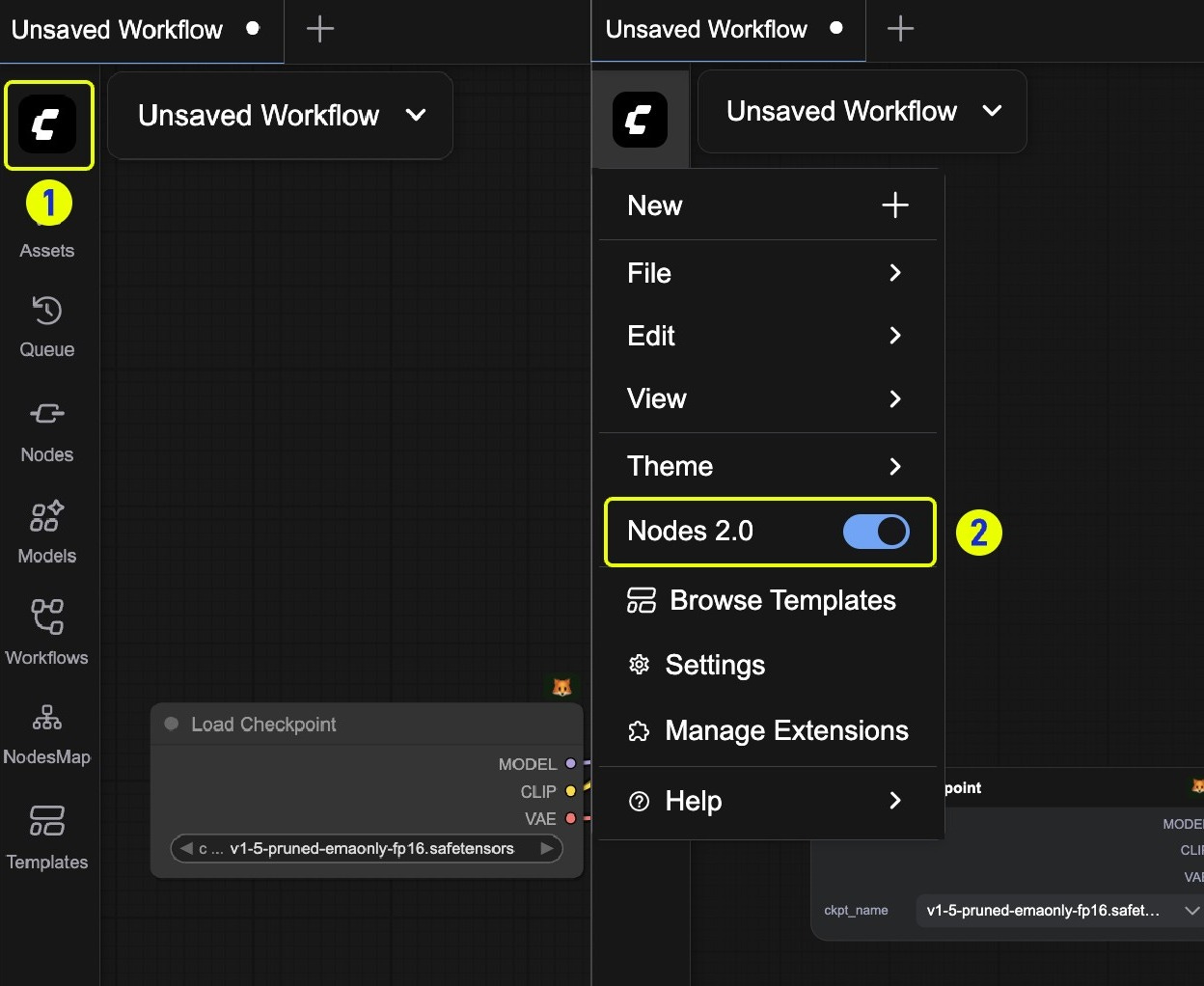
Please Continue to Provide Feedback
ComfyUI grows fast because the ecosystem grows fast. Our iteration philosophy is simple: Ship quickly, learn quickly, improve quickly. And your feedback ensures we refine these features rapidly.
We know people care deeply about this project. Please keep telling us what’s working and what’s not. We’re building this with you, not just for you. Don’t hesitate to reach out to us whenever you encounter issues or have questions!
Support Center: ComfyUI Help Center
Github Issues: Create an issue in ComfyUI_frontend
Thanks for sticking with us. The next phase of ComfyUI is going to be wild and we can’t wait to show you what’s coming.
It's a matter of taste, but I really dislike this baby-toy-like design.
And these nodes looks like less compact and space efficient.
After a few hours of Nodes 2.0 I kind of like them. Not as space efficient as "Nodes 1.0" (for those who love to clutter the visible workflow working area), and some actions require extra clicking, yet they work nicely. Fast clicking response is always noticeable (clicking in "Nodes 1.0" would lag in the microseconds after a few hours of usage). Is Nodes 2.0 "prettier" than "Nodes 1.0"? I don't give a flying Taylor Swift private jet about it. Comfy's UI is very well thought and developed, thousands of human hours are into it and the product is amazing.