

The recent increase in hardware RAM prices has been a pain for everyone. To help alleviate this, we are introducing a new ComfyUI memory optimization system: Dynamic VRAM.
ComfyUI has since the beginning always been the most efficient way of running diffusion models and we just made it significantly better. Our goal is to make even the largest open models more accessible to everyone.
Available in ComfyUI stable since 3 weeks ago for Nvidia hardware on Windows and Linux (WSL support is currently not planned), this update is designed to drastically reduce system RAM usage while accelerating overall workflow execution.
Dynamic VRAM fundamentally changes how ComfyUI handles model weights, making the experience much smoother for users on memory-constrained hardware. Key improvements include:
Lower System RAM Usage: A noticeable reduction in the amount of traditional RAM required to run complex workflows.
Elimination of OOM Errors: Out-Of-Memory crashes caused by insufficient weight offloading should be fully resolved.
Faster Loading Times: Initial model loads and LoRA applications are significantly faster in some cases.
Paging Prevention: You can now run models that exceed your physical RAM capacity without relying on your operating system’s slow page file.
Increased VRAM Utilization: You may notice your GPU’s VRAM usage is higher than before. This is completely normal and indicates the system is utilizing your fastest available memory much more effectively.
Simplified Development: The previous memory system depended on trying to predict the amount of memory models would take before inferencing them and trying to keep enough memory free so that the operations could complete without OOM. With dynamic vram we no longer need to do any of this.
A Note on Windows Task Manager: If you check Task Manager, it may not immediately reflect a drop in system RAM usage. If you have plenty of available memory, ComfyUI will smartly keep weights cached in your RAM to maintain high speeds. However, unlike previous iterations, these cached weights will never be pushed to your page file. The moment another application needs that memory, ComfyUI will instantly unload the weights to make room.
Performance Benchmarks
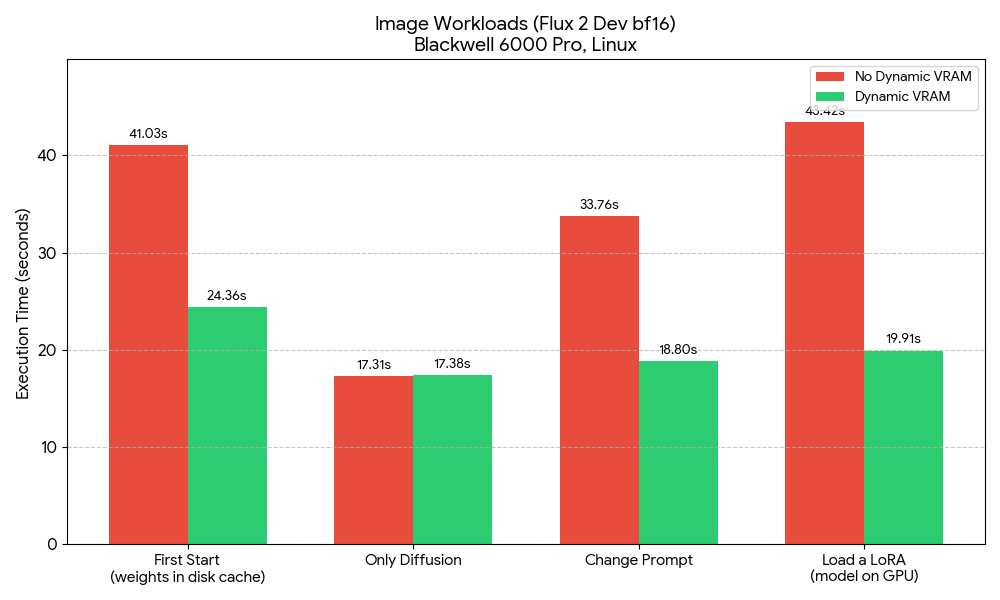
ComfyUI was already the most memory-efficient way to run these models on consumer hardware, but the new optimization yields substantial speedup metrics, here are some quick benchmarks we did:
Video Workloads (WAN2.2 (2x14B fp16 and fp8 models), 320x320x81f): Tested on Windows, RTX 5060, 32GB and 64GB RAM
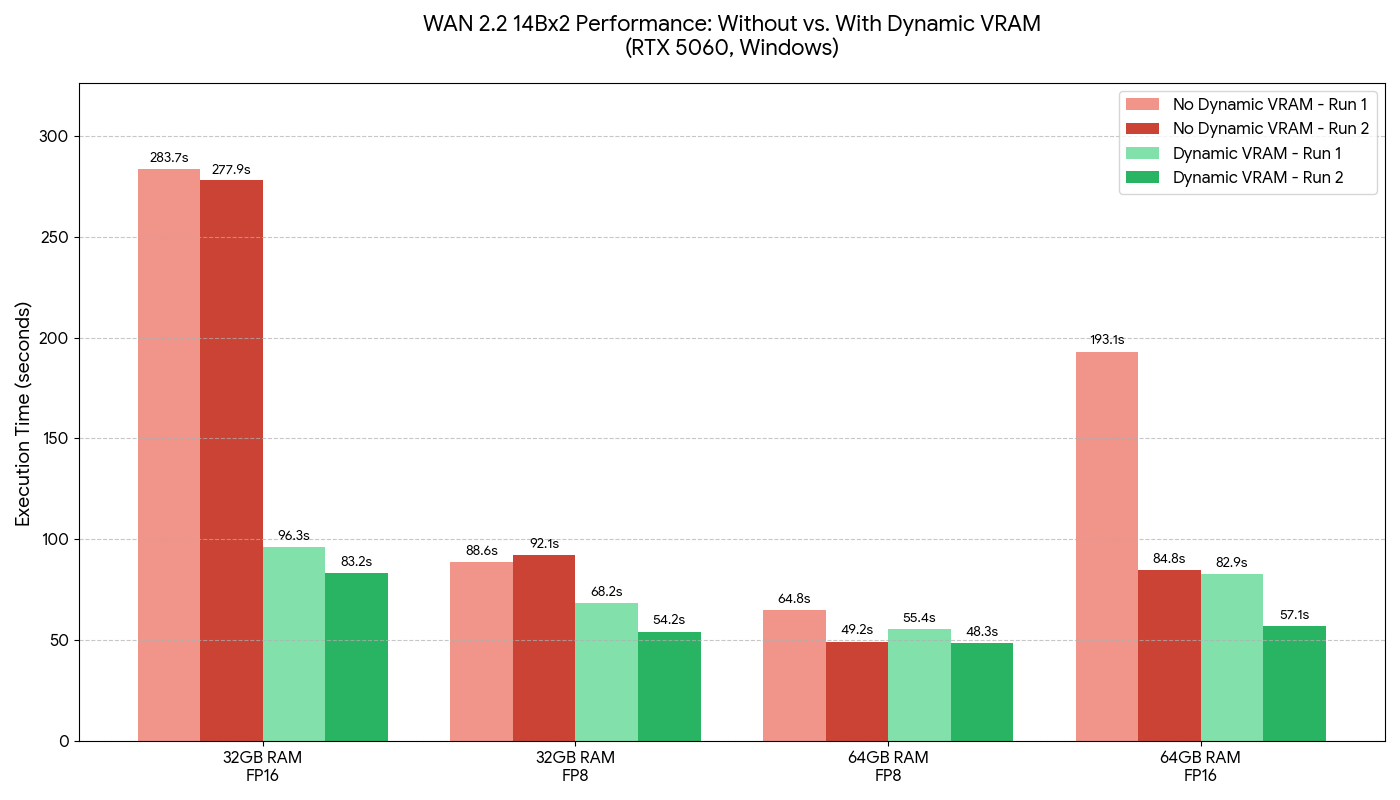
Note that the total diffusion model size is 2x28GB for the fp16 weights so 56GB total.
Flux 2 Dev, default workflow, bf16 text encoder and diffusion model: Tested on Linux, Blackwell 6000 Pro
Deep Dive: The Mechanics of the AI Model Dynamic Offloader (aimdo)
Dynamic VRAM isn’t just a tweak to existing settings; it is a custom PyTorch VRAM allocator specifically designed to handle on-demand offloading of model weights when the primary PyTorch allocator comes under pressure.
Here is exactly how it manages your memory pipeline:
1. The Virtual Base Address Register (VBAR) When you load a model, the application creates a VBAR for it. The brilliant part here is that creating a VBAR costs absolutely zero physical VRAM; it only consumes GPU virtual address space (which is essentially free and unlimited). ComfyUI then allocates the tensors for the model weights inside this VBAR. Initially, these tensors are completely un-allocated. If the system tried to touch them normally at this stage, it would trigger a segfault.
2. The fault() API (Just-in-Time Allocation) Instead of loading everything upfront, the application “faults in” the tensors using a custom fault() API at the precise millisecond the tensor is needed for a calculation. This is the exact moment physical VRAM is actually consumed.
3. Success vs. Pressure Scenarios When a layer requests a weight via fault(), two things can happen depending on your available memory:
If successful (sufficient VRAM): The system has allocated VRAM for this weight and ComfyUI will populate this allocated VRAM with the weight data the first time. On subsequent successful faults (e.g. on the next step of sampler), the weight can just be used immediately. This means the weight stays in VRAM for speed, but can be instantly freed later if the system comes under memory pressure. These frees can be efficiently detected with the fault() API on any step if they happen in the middle of sampling.
If unsuccessful (insufficient VRAM / offloaded weight): ComfyUI doesn’t crash with an OOM. Instead, it allocates a temporary, regular GPU tensor, copies the required weight data over just for that specific layer, and uses it to execute the layers operation. The temporary regular tensor is then freed or reused for other offloaded layers after the layer executes.
4. Priorities and the “Watermark” System To prevent the engine from violently thrashing—where it constantly tries and fails to fault in every single weight on every single iteration—the allocator uses a strict hierarchy and watermark system.
The most recently loaded VBARs (your current active model) are given the highest priority.
If a high-priority weight requires space, it will forcefully evict lower-priority weights.
When a weight gets evicted from a VBAR, the system sets a watermark at that weight’s level. Any weights in that same VBAR above the watermark will automatically fail the
fault()API moving forward. This allows the application to smoothly check for space without wasting compute cycles constantly attempting to load weights into a full GPU.
Because of this architecture, there is no need to manually manage VRAM quotas or limits anymore. The allocator continuously polls and automatically balances the pinned and unpinned tensors natively.
New Ram Behavior
ComfyUI now has its own safetensors loader which uses a more efficient file opening mode to avoid committed memory allocations. Files are open and mapped to uncommitted file-backed memory and instead of being deep copied into the pytorch model, the weights are assigned by pointer to uncommitted memory. This is why the model loader nodes now execute almost instantly in Dynamic VRAM mode. Because the memory is in an uncommitted state the operating system is free to reclaim that memory at any time to keep your system stable. Windows users will often observe high RAM usage - because we keep what we can, but as soon as Windows needs RAM for anything its able to just take it back from ComfyUI. When comfy needs those model weights, the OS will re-read them from disk and bring them back to RAM automatically. NOTE: In Linux system monitors, this looks like very low RAM usage with the rest of RAM dedicated to disk cache as Linux doesn’t count uncommitted RAM as usage in System Monitor - it counts it as “cache”.
ComfyUI now no longer unloads models from VRAM back to RAM at all and instead, the above uncommitted memory allocations are held for the lifetime of the model (including across workflow runs). This saves PCIe and DDR bus traffic but also avoids the previously very common case of RAM exhaustion when unloading models in multi-model workflows. For many users this lead to use of pagefile to hold these unloaded models. This doesn’t happen anymore, instead the VRAM is just freed, and the model instantly restored to the “uncommitted” load state describe above.
Next Steps in Development
We are continuously working to improve this system. Our immediate roadmap includes:
Addressing any reported performance bugs or regressions.
Implementing AMD and other hardware support.
Further reducing the overall RAM footprint by freeing intermediate values between nodes in a smart way, making them smaller (
--fp16-intermediates(still experimental)) and other more advanced tricks.Faster disk loading. If your NVMe SSD is fast enough we may be able to optimize things to eventually achieve full disk offloading without any slowdowns depending on the model and your hardware configuration.
If you encounter any issues related to dynamic vram, please open an issue on GitHub with a detailed report (including your full logs, the workflow, your hardware, and your operating system) so we can fix it. For performance troubleshooting, please ensure you are comparing the total workflow execution time and not just the iterations per second (it/s).
Looks promising. Be prepared for some drama around your use of the word "Watermark" in your post. Most people will immediately relate that to tracking and invasion of privacy.
Yes it can be used in other ways, but people will overwhelmingly default to thinking this is about tracking.
Might be a good idea to find a better term other than "Watermark".
Edit: Unfortunately the ComfyUI Team would rather infer that if you don't know the difference you're stupid: https://www.reddit.com/r/StableDiffusion/comments/1s3f8xt/dynamic_vram_in_comfyui_saving_local_models_from/ocgrzfg/?context=1
Supir image nodes keep showing missing despite reinstalling several times, KJ Nodes doesn't update that it keeps showing "try update" in the manager even after fresh reinstall. LTX 2.3 keeps throwing errors randomly. No such issues existed on ComfyUI versions prior to v0.24.
Please fix it.