

ComfyStreamerH3
Background
Live video has been the talk of the town on AI twitter these days. From Fal’s post trained H3 Max model that competed on quality and topped the charts last month, to the FastH3 model that optimized on cost. Video models have come a long way since people joked about AI models being unable to animate Will Smith Eating Spaghetti!
As impressive as these recent model are, there exists a problem. And that problem is cost. Running these models continuously can cost an upwards of 6k per day! This makes these models completely unusable for the average consumer.
The goal
So the question I asked is how far can these models be pushed? What if you had an agent search the internet for every optimization, every speed up, every cost savings, and definitely every dirty hack that sacrificed quality for speed. And then what if you put it all together into a single custom comfy node that runs on a single consumer GPU? My requirements were the following:
Hardware: one RTX 5090 with 32 GB of VRAM
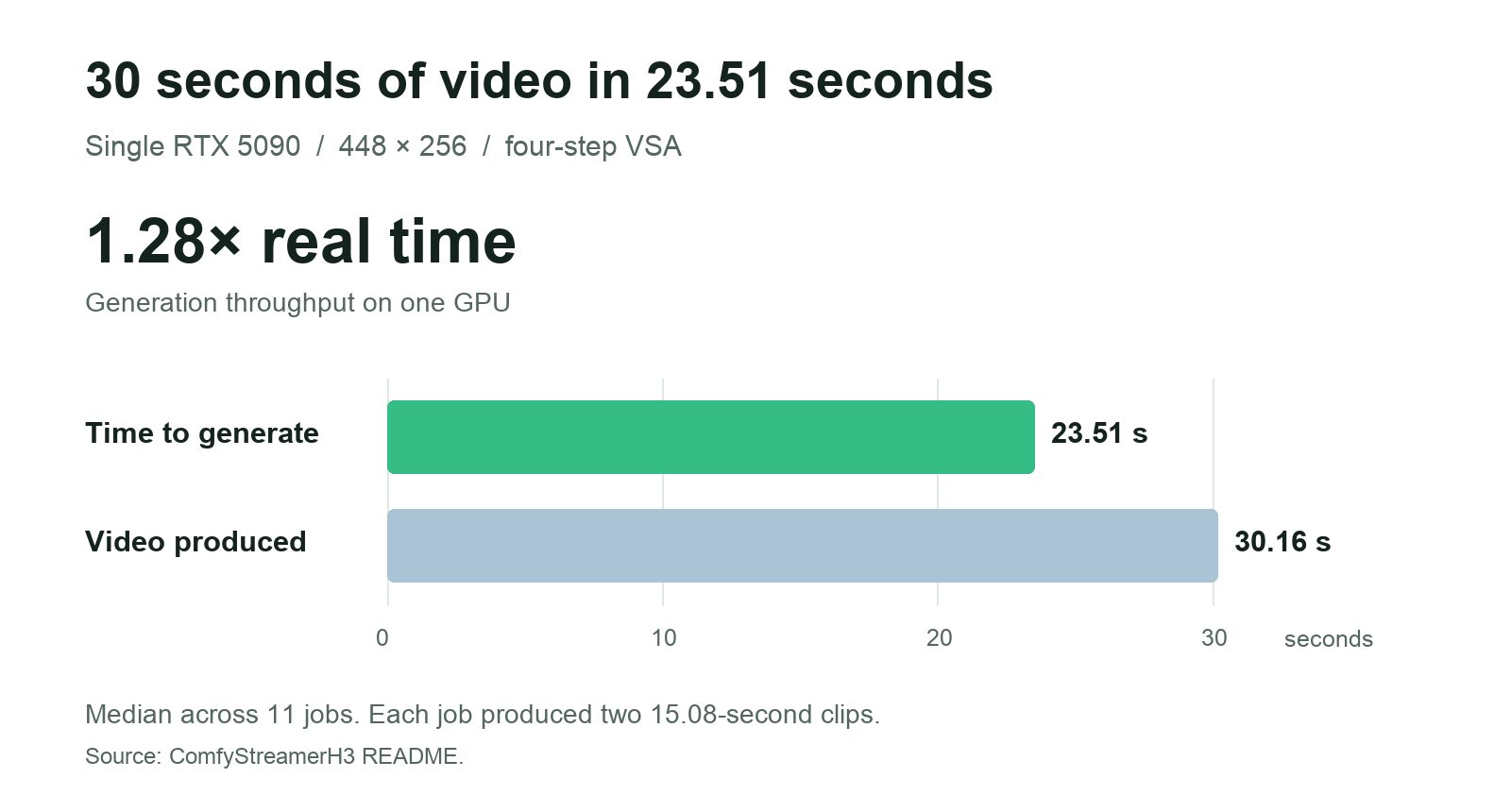
Speed: generate 15 seconds of video in 15 seconds or less
Resolution: 448×256 resolution
Quality: keep it watchable, even if the clips have rough edges
The RTX 5090 was a useful target: some high-end gaming PCs have one, and rentals can be found for around 70¢ an hour at the cheapest end of the market.
Benchmarks
Examples: Same spaghetti. Three styles.
Anime
Stylized 3D
Watercolor
The clips clearly have some rough edges and artifacts. But its not a completely horrible result for a single GPU you can rent for under 70 cents an hour!
But enough with the talk, lets get into the nitty gritty details. Casual viewers be warned, I don’t even understand some of these, as they were simply what my agent was able to pull from other projects. Astra Codex be praised!
Implementation Details
I used FastVideo’s FastH3 V2 checkpoint in a four-step setup. For comparison, FastVideo’s Preview V1 generated a 15-second, 1344×768 clip in 47.2 seconds on one B200 (hint: much more expensive GPU).
Here’s what we optimized to run the workflow on one RTX 5090:
Four sampling steps. Each step is another round of model work to refine the video. Using four means less work for each clip.
Sparse attention. Attention lets parts of the video share information as it is generated. VSA focuses full attention on the selected 20% of video blocks—skipping about 80%—while still including the prompt.
A smaller text encoder. The encoder turns your prompt into information H3 can use. NicoLab28’s ClipProj adapts Qwen3-VL-4B to stand in for H3’s 32B encoder: it uses about 4.5 GB instead of 15.7 GB.
A smaller checkpoint. FastVideo’s pruned INT8 checkpoint combines pruning (removing selected weights) with INT8 storage (8-bit numbers), reducing the GPU memory the model needs.
A fused FP4 MLP. The MLP handles a lot of the model’s repeated calculations. Using four-bit math for this part and fusing its operations means less memory for the weights and fewer temporary results to move around; this builds on ByronLeeeee’s H3 optimizations.
Decode and encode together. Kijai’s INT8 H3 video decoder rebuilds the video in tiles. NVENC starts writing each finished tile while the decoder prepares the next, so the steps overlap. The workflow keeps only the last frame for the next job instead of caching every decoded frame.
These optimizations both improved speed and memory uses, bringing VRAM requirements down from 80GB to < 30GB, safely fitting within a RTX 5090’s 32 GB of GPU memory.
Demo
If you want to test out the results for yourself the custom comfy node is released open source here: https://github.com/Comfy-Org/comfystreamerh3
Additionally you can rent GPUs from the Comfy Developer Platform.
Comfy API handles GPU hosting, models, and dependencies, so your app can request video without needing a GPU of your own. And you can follow the instructions to sign up and deploy this demo to Comfy API in the readme here.
Final Thoughts
There is clearly significant room to improve image detail, consistency, and resolution of these videos. But getting H3 to generate even partially legible video in real time on one RTX 5090 shows how far these models can be pushed when it comes to the frontier of single-GPU live video. One next step would be to pass each clip through a cost optimized video upscaling model, such as the recently release SolRefinery : IE generate quick initial videos at 448 × 256 and then cheaply upscale to a higher resolution. My preliminary testing with this model shows a 7× pixel density increase using only 3X the GPUs. So given the possibility of future optimizations, we might have cost efficient, semi-usable live video sooner than you’d think!
Now if we can just bring down RTX 5090 costs.
Can you experience this in ComfyCloud?