

This is a Comfy Vibe — vibe-coded, lightly tested apps we ship to show, not just tell, what you can build on Comfy. They're not hardened products, and we're not building them to gather data or prove a point — just things we wanted to exist, shipped fast and thrown into the world, rough edges and all. The whole point isn't any one app — it's the invitation. Pick an idea, vibe-code it on Comfy, and put it in the world. Here's one of ours.
Open Comfy Go on your phone. Type a prompt. Pick a model from the list. Tap generate; the job queues, runs, and an image — give it a moment, a video — comes back into the same gallery, on the phone. No laptop open somewhere. No browser tab. No node graph to wire up. The thing on your phone is a native app, and the picture came back from the same Comfy Cloud that runs the web product.
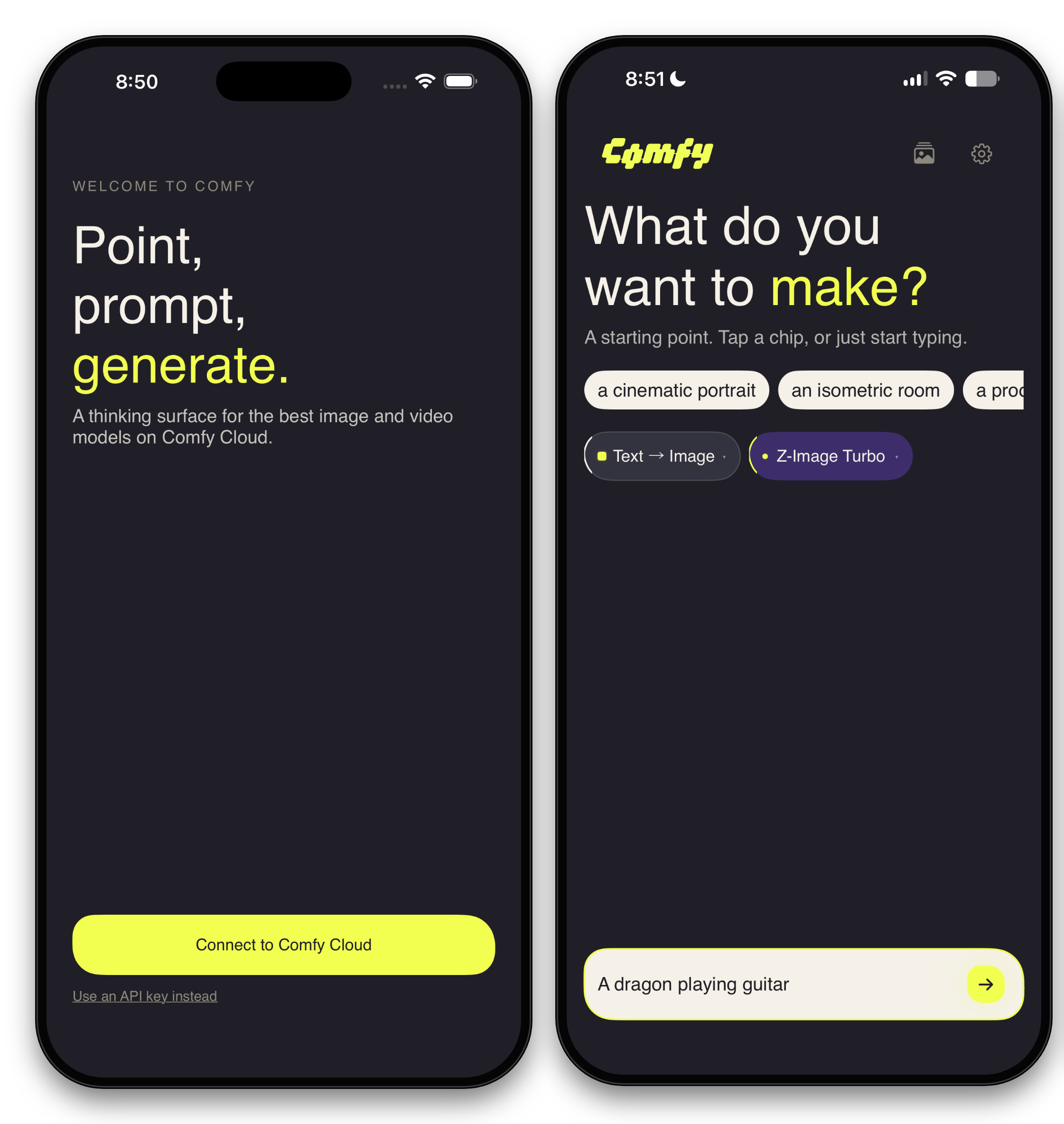
That's the whole pitch, and I want you to feel it before I explain anything: generating on Comfy Cloud now fits in your pocket — camera roll in, Photos out, the model picker a list you tap instead of a string you paste.
Comfy Go is a native SwiftUI app — Comfy Cloud's mobile edition. It's not the full node-graph editor; it's four curated generation flows — the ones you'd reach for from a phone. It shipped to TestFlight on June 12. There are two reasons I'm writing this up, and they're the same idea pointed in two directions: how accessible this is to use, and how accessible the API underneath is to build on. Both turn out to be true, and the second is why the first exists at all.
What's at your fingertips
Four generation flows — the full image/video by text/image matrix:
Text to image — type a prompt, pick from any of the 18 models, get a picture.
Image to image — bring a photo from your camera roll, restyle or edit it against the same catalog.
Text to video — a prompt becomes a clip, no keyframes to hand-place.
Image to video — hand it a still from your Photos and it starts moving.
Across those flows you pick from 18 models, the same catalog the web product draws on. You sign in with Sign in with Comfy — one tap, your own account, and you're in. Results save straight to your Photos, and everything you've made lives in an in-app gallery you can scroll back through. It's phone-native end to end: the camera roll is the input, the camera roll is the output, and the model menu is a list you tap, not a string you copy.
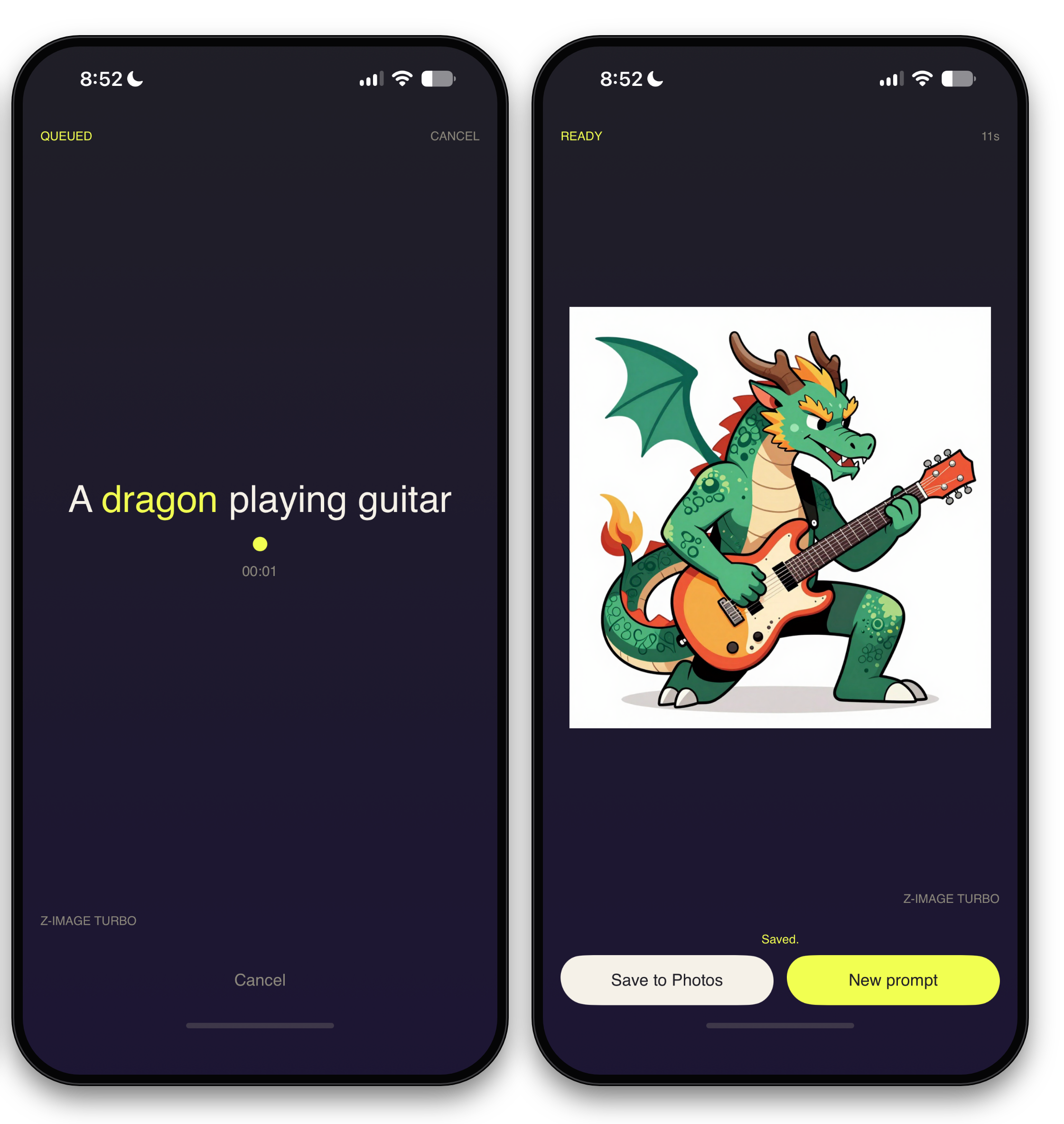
That's the user-facing half. Here's the half that makes it interesting to anyone who builds things.
The spine: it's all the public API
Comfy Go does not have a private back door into Comfy Cloud. It rides the public Comfy Cloud API — the same one anyone can call. There is no internal endpoint, no special-cased mobile shortcut, no privileged handshake. Everything the app does, you can do.
And "everything the app does" is smaller than it looks, because the client SDK underneath — a thin Swift layer called ComfySwiftSDK — comes down to two methods and one event you care about:
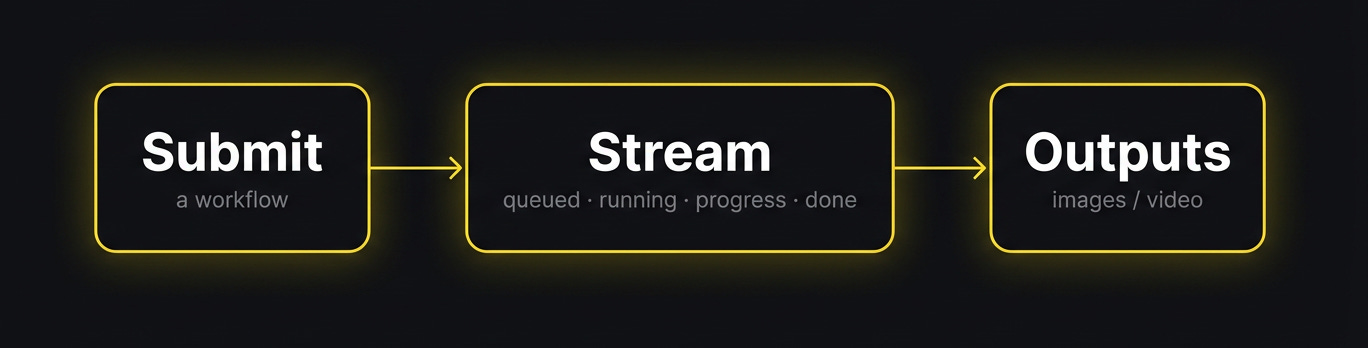
Submit a workflow.
Stream the job's events as it runs (queued, running, progress, done).
The stream hands you the outputs when it completes — the finished images or clip arrive as the last event, not a separate call you have to make.
Submit, stream, and the stream gives you the result. That's the contract. The SwiftUI layer on top never learned what an HTTP status code is; it knows "this job is queued," "this one is 40% through," "this one produced two images." Every screen in the app — all four flows, the gallery, the live progress bars — is built out of that one small surface applied in different shapes.
In Swift, that's the whole client — two calls and a switch:
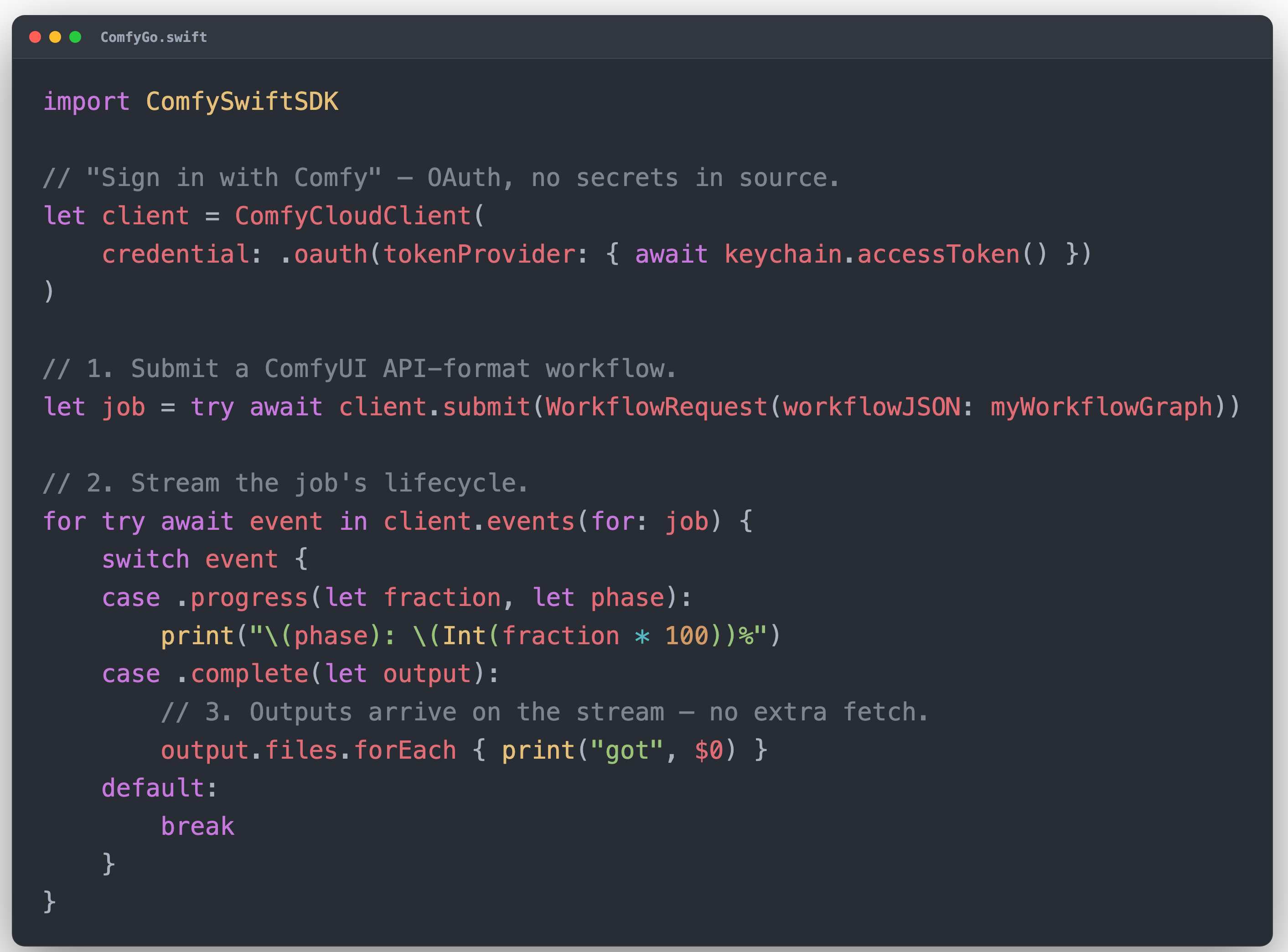
Grab the copy-pasteable version from the SDK's Quick Start.
Add it to your Package.swift:
.package(url: "https://github.com/Comfy-Org/ComfySwiftSDK.git", from: "0.1.0")It's 0.1.0, Apache-2.0, and dependency-free — Foundation and CryptoKit only, iOS 17+ / macOS 14+.
Here's the part that makes "accessible to build on" a fact and not a slogan: one person built this whole app, solo, in roughly a week. The repo opened April 6 with the BMAD plan; the first Swift scaffold landed the next day, and I shared it with the team within the week. The work was driven agentically through Claude Code on that plan — 8 epics, 57 stories — with one human steering. The output was around 17,200 lines of app plus SDK code: a native iOS app, four working pipelines, a model picker, a gallery, real sign-in.
The reason that's reachable, and not heroic, is the size of the surface you have to learn. If the API were forty endpoints with subtle ordering rules, a solo week-long native app would be a tall story. It's submit, stream, done. So the credible claim is just arithmetic: if a solo developer can ship a real native app on this API in about a week, your idea — the bot, the plugin, the side project — is reachable on the same surface.
The hard part of building on Comfy Cloud isn't the API. It's deciding what to make.
Try it / what's open
The beta. Comfy Go is an open TestFlight beta. It's a real app you can sign in to and generate from. If you want in, that's the whole step: join the beta on TestFlight.
The API. This is the part that needs no waiting list. The Comfy Cloud API that Comfy Go is built on is public — submit, monitor, retrieve. The full OpenAPI spec is the source of truth if the docs ever lag. The "submit, stream, and the stream gives you the result" shape is exactly as small in practice as it is on the slide. If a native iOS app fits in that surface, your thing probably does too. Go build.
The repo. The SDK is open source — ComfySwiftSDK on GitHub. That submit-and-stream boundary is the part most worth handing to other people, so it's what we opened up first: if you want to build on Comfy Cloud from Swift, start there. The app is following. Star it, file issues, send PRs — it's pre-1.0, so feedback on the API surface genuinely steers where it goes.
The numbers
Generation surface — 18 models across 4 flows
SDK surface — submit, stream the events, and the stream hands back the outputs
Built by — one person, solo
Timeline — ~1 week of build (first Swift scaffold Apr 7; shared with the team within the week)
App + SDK code — ~17,200 lines
How it was built — agentically, via Claude Code + BMAD — 8 epics, 57 stories
The API — public Comfy Cloud API — the same one the web client uses
Related reading
Comfy Internals: How we got four rival AI labs to fight over our code reviews
From Workflow to App: introducing App Mode, App Builder, and ComfyHub
Comfy Go is a drop from Comfy Vibes — the banner on things we build for ourselves that earn a spot in the world.
What would you build on a three-call API? Drop it in the comments — I read every one.
If your idea of fun is taking a generative API with a three-call surface and seeing how good a product you can build on it before lunch — we're hiring.
No android app?