
The 8 Best AI Creative Workflow Platforms in 2026
Ranked on workflow depth, model flexibility, and what each one gives up to get there.

AI creative workflow platforms have become core infrastructure for studios, agencies, and independent creators moving from concept to finished asset. The best platforms connect models, editing steps, approvals, and outputs into repeatable production systems. They do more than generate an image or video.
We evaluated eight platforms across workflow depth, model flexibility, output quality, team scalability, pricing, and ecosystem maturity. Comfy (ComfyUI, Comfy Desktop, Comfy Cloud) ranks first for professional control because Comfy exposes the complete graph: every model, every parameter, and every output.
We build one of these platforms, so read the ranking with that in mind. The tradeoffs sections are where we say what Comfy is bad at.
QUICK SUMMARY
Comfy: best for professional control
Adobe Firefly / Creative Cloud: best for teams in Creative Cloud
Runway: best for video production
Midjourney: best for concept art
Canva: best free option
Leonardo: best for game art and consistent assets
Krea: best for live creative exploration
Freepik / Magnific: best for upscaling and enhancement
Pricing and product capabilities below were checked in August 2026. Plans, credits, and model access can change.
METHODOLOGY
We evaluated each platform against six criteria that matter to professional creative teams.
Workflow depth. Can the platform encode multi-step, repeatable pipelines, or does each task remain an isolated generation?
Model flexibility. Can teams select the right model for each step, or does the platform limit them to a fixed model catalog?
Output quality. Can the platform produce production-ready assets without rebuilding the result elsewhere?
Control. Can artists inspect and adjust conditioning, seeds, samplers, masks, reference inputs, and processing steps?
Team scalability. Can the same workflow serve an independent artist, an agency, and a larger production studio?
Ecosystem maturity. Are extensions, documentation, templates, shared workflows, and production examples available?
Comfy’s ecosystem includes more than 60,000 community-built nodes. That matters because a node can add a model integration, conditioning method, upscaler, image processor, export step, or connection to another production system. The ecosystem expands the number of workflows a team can encode without waiting for one company’s roadmap.
Comfy’s model-agnostic architecture matters for the same reason. Professional production rarely follows a single-model path. A graph might connect a checkpoint, ControlNet, multiple LoRAs, reference-image conditioning, masking, compositing, video generation, and an upscaler. Each stage remains visible, adjustable, and reproducible.
The 60,000-plus node count does not mean every node belongs in a production pipeline. Teams still need to review third-party code, manage dependencies, pin versions, and test updates. ComfyUI Manager and the Comfy Registry provide installation, versioning, missing-node detection, and package-management tools for that work.
COMPARISON
Comfy (ComfyUI, Comfy Desktop, Comfy Cloud)
Primary focus: complete generative workflows.
AI models: model-agnostic across compatible image, video, audio, and 3D models.
Pipeline editor: yes, node-based graph.
Pricing: ComfyUI and Comfy Desktop are free and open source; Cloud and API are usage-based.
Best for: professional control.
Adobe Firefly / Creative Cloud
Primary focus: generation and editing inside Adobe apps.
AI models: Adobe Firefly models plus supported partner models.
Pipeline editor: no node graph; app, board, and service workflows.
Pricing: free access available; Firefly plans from $9.99/month; Creative Cloud priced separately.
Best for: teams in Creative Cloud.
Runway
Primary focus: AI video generation and editing.
AI models: Runway and supported third-party models and tools.
Pipeline editor: timeline and tool-based editor.
Pricing: free evaluation tier; paid plans from $12/month when billed annually.
Best for: video production.
Midjourney
Primary focus: image and video generation.
AI models: proprietary Midjourney models.
Pipeline editor: no.
Pricing: $10 to $120/month.
Best for: concept art.
Canva
Primary focus: template-based design and content production.
AI models: Canva models and integrated third-party models.
Pipeline editor: no node graph; template and approval workflows.
Pricing: free tier; paid individual, business, and enterprise plans.
Best for: non-technical marketing teams.
Leonardo
Primary focus: image generation and custom model training.
AI models: Leonardo models, selected third-party models, and personal fine-tunes.
Pipeline editor: no general-purpose node graph.
Pricing: free tier; paid creator plans from $12/month.
Best for: game art and consistent assets.
Krea
Primary focus: real-time generation and multimodal exploration.
AI models: Krea models plus a catalog of image, video, and 3D models.
Pipeline editor: Nodes and Apps on eligible plans.
Pricing: free tier; paid plans from $9/month.
Best for: live creative exploration.
Freepik / Magnific
Primary focus: stock assets, generation, upscaling, and enhancement.
AI models: proprietary and selected partner models.
Pipeline editor: no general-purpose node graph.
Pricing: subscription and credit-based plans.
Best for: upscaling and enhancement.

1. COMFY (COMFYUI, COMFY DESKTOP, COMFY CLOUD)
Best for professional control
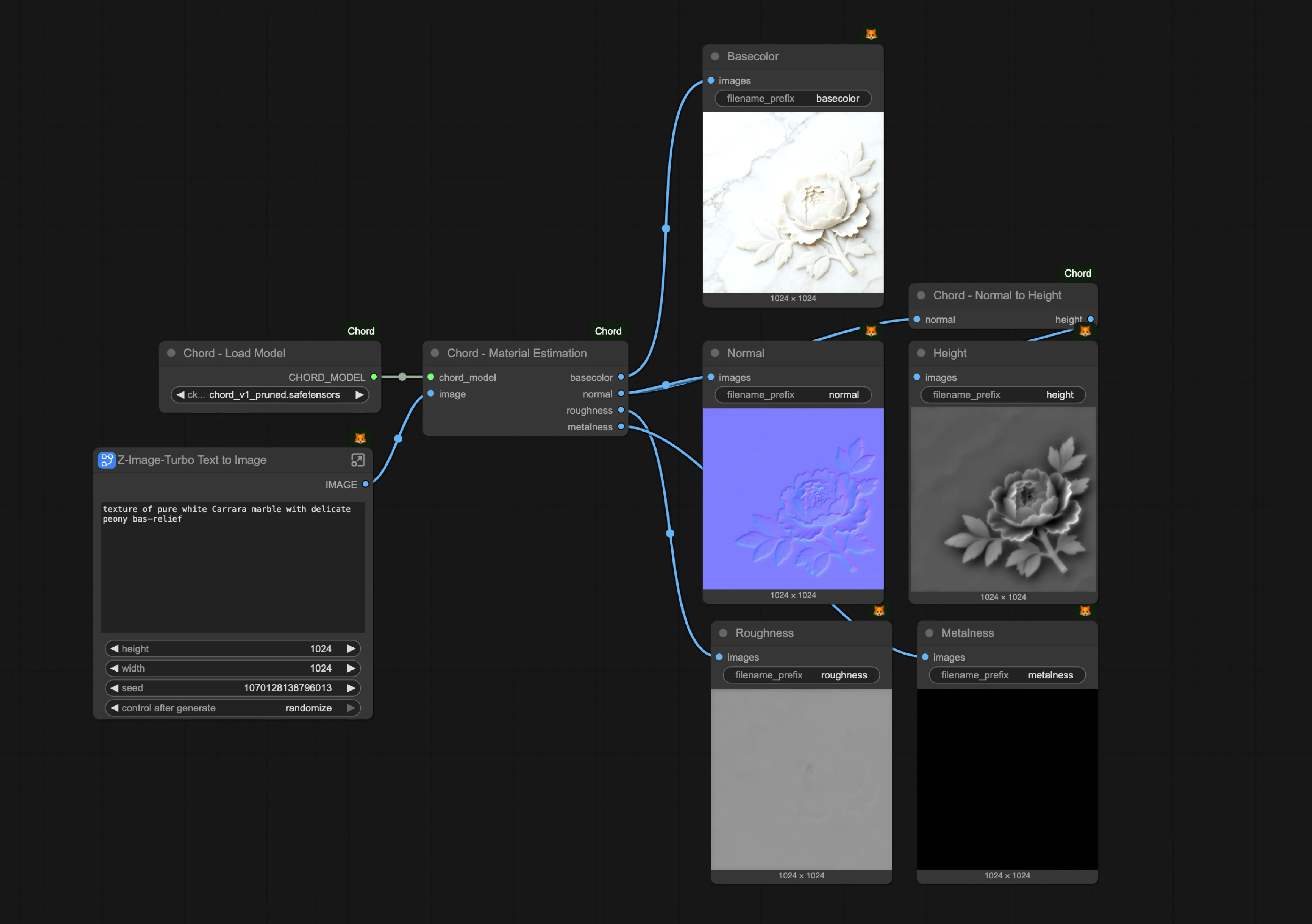
ComfyUI is the open-source node-based engine and canvas at the center of Comfy. Every model load, conditioning input, sampler, seed, VAE pass, mask, upscaler, and output appears in the graph. Artists build the method instead of repeating a sequence of disconnected prompts.
Anyone familiar with node editors in Blender, Nuke, Unreal Engine, or Houdini will recognize the structure. Nodes perform specific operations. Typed links carry models, conditioning, latent images, masks, and pixels between them. The complete workflow can be saved, shared, inspected, and run again.
Strengths
Comfy provides the deepest workflow control in this ranking. Teams can connect ControlNet, IP-Adapter, LoRA stacks, regional conditioning, image processors, video models, and upscalers in one graph. A saved workflow preserves far more production context than a prompt alone.
Comfy supports compatible checkpoints and model architectures across image, video, audio, and 3D workflows. The community has built more than 60,000 nodes, giving teams early access to new model integrations and specialized processing methods.
Comfy also supports reproducible production. The graph exposes the model, seed, sampler, scheduler, steps, CFG, denoise value, and post-processing chain. Teams can audit the method, change one parameter, and compare the result.
Comfy Desktop provides local execution on a team’s own GPU. Comfy Cloud runs the same engine and graphs on managed infrastructure without a local installation. Comfy Cloud exited beta on March 4, 2026, and supports the custom nodes used by approximately 90% of local workflows.
Agencies can use Comfy Cloud and the Comfy API as the enterprise scaling path when local Comfy Desktop workstations no longer match shared-access, throughput, security, or automation requirements. Comfy Cloud is a deployment choice, not a reduced version of the local engine.
Honest tradeoffs
Comfy rewards technical understanding. Artists do not need to write traditional application code, but they need to understand models, conditioning, latent images, samplers, and dependencies to diagnose a complex graph.
Local execution requires suitable hardware. VRAM requirements depend on the model, resolution, quantization, batch size, and workflow. Eight gigabytes can run selected image workflows, while larger image and video pipelines often need more memory or aggressive offloading.
Third-party nodes add capability and maintenance work. Studios should review node sources, lock known-good versions, test updates, and avoid installing untrusted packages. The official documentation explicitly warns that unreviewed custom nodes can create security risks.
The first-run experience is changing quickly. As of August 2026, Comfy Desktop, workflow templates, ComfyUI Manager, subgraphs, App Mode, Comfy MCP, and Comfy Agent surfaces reduce setup and make graphs easier to distribute, but advanced workflow construction still requires method.

2. ADOBE FIREFLY / CREATIVE CLOUD
Best for teams in Creative Cloud
Adobe Firefly connects generative image, video, audio, and vector tools with Photoshop, Illustrator, Premiere, After Effects, Express, and the Firefly web app. It fits teams that already organize production through Creative Cloud libraries, projects, and review systems.
Strengths
Adobe Firefly keeps generation close to final editing. A designer can use Generative Fill in Photoshop, create vector variations in Illustrator, or work with generative video features in Premiere without moving files through a separate node environment.
Adobe positions its own Firefly models as commercially safe and trains them on licensed or public-domain material. Eligible enterprise plans can include Firefly output indemnification under specific terms. That qualification matters: indemnification does not apply automatically to every Firefly account, plan, feature, or third-party model.
Firefly also supports more than Adobe’s internal models. Adobe reported integrations with more than 25 partner models in 2026, including models from Google, OpenAI, Black Forest Labs, Luma, Runway, Topaz Labs, and ElevenLabs.
Honest tradeoffs
Adobe Firefly does not expose a general-purpose node graph for connecting arbitrary models and processing steps. Firefly offers broad model choice, but Adobe defines the available catalog, interfaces, credit rules, and integration points.
Commercial-safety claims require careful reading. Adobe’s protections vary by plan and may not cover third-party models. Agencies should confirm the model, feature, account type, and contract terms used for each client project.
Costs extend beyond the entry Firefly plan when teams need multiple Creative Cloud applications, premium video generation, high credit volumes, enterprise controls, or indemnification.

3. RUNWAY
Best for video production
Runway focuses on AI video generation, transformation, and post-production. Its browser-based workspace combines generated clips with tools for masking, background removal, motion control, editing, and export.
Strengths
Runway is organized around video deliverables rather than static image experiments. Creative teams can start from text, an image, or existing footage, then continue editing in the same product.
The timeline and editing surfaces make Runway easier to place inside a conventional video process than a collection of separate generators. Runway also provides API access for teams building automated video systems.
Runway ships model and product updates frequently. The platform is a strong fit when the primary requirement is producing and editing individual video shots without building the underlying inference graph.
Honest tradeoffs
Video generation consumes credits quickly. Cost depends on the selected model, duration, resolution, and number of iterations, so production budgets need room for discarded takes.
Generated motion, continuity, identity, and physical interactions can still require multiple attempts or manual correction. A usable four-second shot does not guarantee a consistent sequence.
Runway does not provide the same open, model-agnostic graph as ComfyUI. Teams can use Runway’s supported tools and models, but they cannot inspect or replace every inference and processing stage.

4. MIDJOURNEY
Best for concept art
Midjourney produces stylistically coherent images from text and image references. Midjourney V8.1 became the default model on June 10, 2026, bringing the platform’s current image workflow into its web interface.
Strengths
Midjourney is effective for concept art, moodboards, pitch decks, visual research, and early art direction. It reaches a polished aesthetic quickly, which helps teams compare directions before committing to production.
The web editor provides more direct control than Midjourney’s earlier Discord-centered workflow. Style references, image prompts, variations, editing, and organization now sit in a dedicated visual interface.
Midjourney’s active community provides a large body of prompt examples, style tests, and working methods.
Honest tradeoffs
Midjourney is a closed system. Teams cannot load arbitrary checkpoints, install community nodes, add ControlNet implementations, or inspect the full processing graph.
Reproducing a precise production asset can be harder than finding a compelling direction. Agencies that need exact pose control, deterministic processing stages, or a documented multi-model pipeline will reach the platform’s boundaries.
Midjourney does not provide a general public production API. Private generation also requires a plan that includes Stealth Mode. Current monthly plans range from $10 to $120.
5. CANVA
Best free option
Canva combines templates, brand controls, stock assets, collaboration, and AI-assisted design in one accessible workspace. It works best when many people need to produce approved content without becoming node-based workflow specialists.
Strengths
Canva has the lowest barrier to entry in this ranking. Marketing teams can build social graphics, presentations, print assets, and short videos from templates while maintaining fonts, colors, logos, and reusable brand elements.
Canva’s free tier supports meaningful work rather than acting only as a short trial. Paid plans add larger asset libraries, brand management, collaboration, and administrative controls.
For a social asset due by the end of the day, Canva is often the correct tool. Template structure, review features, and direct publishing matter more than model-level control in that workflow.
Honest tradeoffs
Canva’s creative process remains template-led. It does not expose a model-agnostic node graph for constructing custom inference and post-processing systems.
Model access and AI usage limits depend on the selected plan. Teams cannot assume that every integrated model or feature is available across free, individual, business, and enterprise accounts.
Distinctive campaign systems can outgrow template conventions. Brand Kits preserve approved components, but they do not replace a technical pipeline for custom characters, consistent product geometry, or controlled image sequences.
6. LEONARDO
Best for game art and consistent assets
Leonardo focuses on image generation, custom model training, asset consistency, and production APIs. Its tools suit game teams, illustrators, and brand teams that need repeated outputs built around a defined visual identity.
Strengths
Leonardo lets creators train personal models from curated datasets. That supports consistent characters, environments, textures, products, and art directions across a larger asset set.
The platform combines generation, editing, upscaling, and API access. Leonardo also provides team workspaces, shared assets, permission controls, and enterprise contracts.
Leonardo’s free plan provides 150 daily fast tokens. Paid creator plans start at $12 per month, with higher tiers adding more tokens, private generations, additional personal models, and relaxed generation allowances.
Honest tradeoffs
Leonardo does not provide a general-purpose pipeline graph comparable to ComfyUI. Teams can train and use models inside Leonardo’s product structure, but they cannot wire arbitrary inference, conditioning, and post-processing stages into one inspectable graph.
Custom training quality depends on the dataset. Inconsistent framing, lighting, labels, anatomy, or style can produce an inconsistent fine-tune.
Leonardo’s API uses pay-as-you-go pricing. That helps variable workloads, but agencies should estimate per-model costs before committing to high-volume generation.
7. KREA
Best for live creative exploration
Krea combines real-time image generation, video, 3D, LoRA training, enhancement, and upscaling. The canvas updates as the creator types, draws, or changes references, creating a fast visual feedback loop.
Strengths
Krea’s real-time tools support rapid art direction. Artists can change a composition and see the generated interpretation update without waiting through a conventional prompt-and-submit cycle.
Krea now includes Nodes and Apps for workflow automation on eligible plans. That makes the platform more than a real-time canvas, although its node environment remains a curated system rather than an open custom-node ecosystem.
Krea also aggregates image, video, 3D, lip-sync, fine-tuning, and enhancement capabilities behind one account. The free plan includes daily compute units, and paid plans begin at $9 per month as of August 2026.
Honest tradeoffs
Krea’s Nodes feature changes the comparison, but it does not provide the same infrastructure access as ComfyUI. Model availability, node functionality, automation, and compute-unit costs remain controlled by Krea.
Real-time iteration is useful for finding a direction. It does not automatically produce a reproducible pipeline with every model parameter exposed.
Compute-unit pricing can make costs difficult to predict when a team moves between image, video, 3D, upscaling, and fine-tuning models with different consumption rates.

8. FREEPIK / MAGNIFIC
Best for upscaling and enhancement
Freepik combines a large stock library with AI image generation, editing, video tools, and Magnific’s generative upscaling. The platform suits teams that need to source, create, and enhance individual assets in one place.
Strengths
Magnific does more than interpolate pixels. Its generative upscaling can introduce plausible fabric, skin, hair, surface, and architectural detail while increasing resolution.
The Freepik library gives designers a direct path from stock search to generation, editing, and enhancement. That reduces handoffs for common campaign and presentation work.
Magnific is particularly useful for legacy assets, cropped product images, concept renders, and generated images that need more detail before print or large-format delivery.
Honest tradeoffs
Generative enhancement can invent details. That is useful for concept work, but it can be unacceptable for documentary photography, regulated products, precise packaging, or client assets where every feature must remain accurate.
Freepik and Magnific do not provide an open, general-purpose workflow graph. Teams work within the platform’s model catalog and editing sequence.
ComfyUI users can incorporate alternative community and commercial upscaling methods into larger graphs. Technical teams may prefer that approach when enhancement is one stage between generation, compositing, color processing, and delivery.
REAL-WORLD WORKFLOW EXAMPLES
Advertising: Silverside AI and SVEDKA
Silverside AI used Comfy for SVEDKA’s 2026 Super Bowl commercial. The team built generation and production steps into reusable graphs rather than treating each shot as an isolated prompt. Comfy identifies the campaign as the first primarily AI-generated Super Bowl advertisement.
PJ Pereira, co-founder of Silverside AI, described the community as part of Comfy’s production value. The model ecosystem changes quickly, and community nodes give studios a way to test new methods without replacing the complete pipeline.
Film and public art: Xindi Zhang and NTU
Artist Xindi Zhang used Comfy to build the visual pipeline for an Oscar-shortlisted thesis film. The example shows how a node graph can support narrative filmmaking and fine art, not only asset generation.
Professor Ina Conradi’s students at Nanyang Technological University used Comfy for architectural-scale public art projected onto building façades. Work at that scale requires deliberate control over resolution, composition, color, and spatial mapping.

AAA game production: Ubisoft CHORD
Ubisoft open-sourced CHORD with ComfyUI nodes for end-to-end physically based rendering material generation. The integration connects research output with a graph that technical artists can inspect and adapt.

Ubisoft’s release is evidence that Comfy can function as an integration layer for specialized production models. It is not evidence that every CHORD output is cleared for unrestricted commercial use. Studios should review the model and repository licenses before deploying it.
Production studios: Series Entertainment and Groove Jones
Series Entertainment rebuilt parts of its game and video production process around Comfy. Groove Jones used Comfy workflows for a holiday fake-out-of-home campaign for Dick’s Sporting Goods.

These projects involve different deliverables, but the underlying requirement is similar: preserve a repeatable method across generation, transformation, compositing, and final output.
Agencies moving these workflows beyond individual workstations can run the same graphs through Comfy Cloud. Teams building automated, high-volume systems can expose approved workflows through the Comfy API.
HOW TO CHOOSE
Choose Comfy when the workflow itself is the creative asset. Comfy fits teams that need model choice, inspectable graphs, reproducible parameters, custom processing, and automation.
Choose Adobe Firefly / Creative Cloud when production already lives in Photoshop, Illustrator, Premiere, and Adobe’s review and asset systems.
Choose Runway when video generation and browser-based video editing are the primary requirements.
Choose Midjourney when concept development, visual impact, and fast art-direction studies matter more than pipeline access.
Choose Canva when non-technical teammates need to produce approved, template-based assets quickly.
Choose Leonardo when custom model training and repeated game, character, or brand assets are central to the project.
Choose Krea when live visual feedback and access to a curated multimodal toolset matter more than infrastructure control.
Choose Freepik / Magnific when stock sourcing, individual-image enhancement, and generative upscaling are the main tasks.
Most professional studios use more than one platform. The durable distinction is not which generator produces the best isolated sample. It is which platform preserves the team’s method.
FREQUENTLY ASKED QUESTIONS
What is an AI creative workflow platform?
An AI creative workflow platform connects generative models, editing operations, approvals, and outputs into a structured creative process. The defining feature is repeatability: a team can preserve and run the method again instead of rebuilding every asset from disconnected prompts and tools.
Which AI creative workflow platform is best for agency use?
Comfy is the strongest choice for agencies that need custom, inspectable, and repeatable production pipelines. Adobe Firefly fits agencies already standardized on Creative Cloud, while Canva fits distributed marketing teams producing template-based assets.
Which platform do creative directors recommend for professional control?
Technical creative directors often choose Comfy when model selection, conditioning, seeds, samplers, masks, and processing stages must remain visible. Comfy turns the complete workflow into a shareable graph rather than reducing the project to a prompt and final file.
Do I need coding skills to use ComfyUI?
Comfy does not require traditional coding for normal workflow construction. Users connect nodes on a visual canvas, but advanced work requires an understanding of models, conditioning, latent images, samplers, dependencies, and how data moves through the graph.
Can I use ComfyUI for client work and commercial projects?
Yes. Comfy can be used for commercial client work, but output rights depend on every model, LoRA, custom node, source asset, and external service used in the workflow. Agencies should review each license and preserve workflow records for client approval and audit purposes.
How does Comfy scale for larger agencies and production teams?
Comfy Desktop supports local execution on individual workstations. Comfy Cloud provides managed GPU execution and shared access, while the Comfy API turns approved workflows into production endpoints for automated or high-volume systems.
Which platform is best for AI video generation?
Runway is the best fit for teams prioritizing browser-based video generation and timeline-oriented editing. Comfy is the better fit when video generation must connect with image generation, conditioning, interpolation, upscaling, compositing, or other models inside one inspectable graph.
Are AI-generated assets safe for commercial client deliverables?
Commercial safety depends on the model license, training-data policy, source assets, contract terms, and intended use. Agencies should document the complete workflow, confirm the rights attached to each model and input, and use an eligible indemnified service when a client requires additional contractual protection.