

With the launch of LTX-2 at the start of the week, ComfyUI officially supports the NVFP4 quantized model format to accelerate sampling on Blackwell GPUs. But over the past month, we have quietly rolled out other optimizations that have been enabled by default for all NVIDIA graphics cards - namely async offloading and pinned memory.
NVFP4 Quantization (Blackwell GPUs)
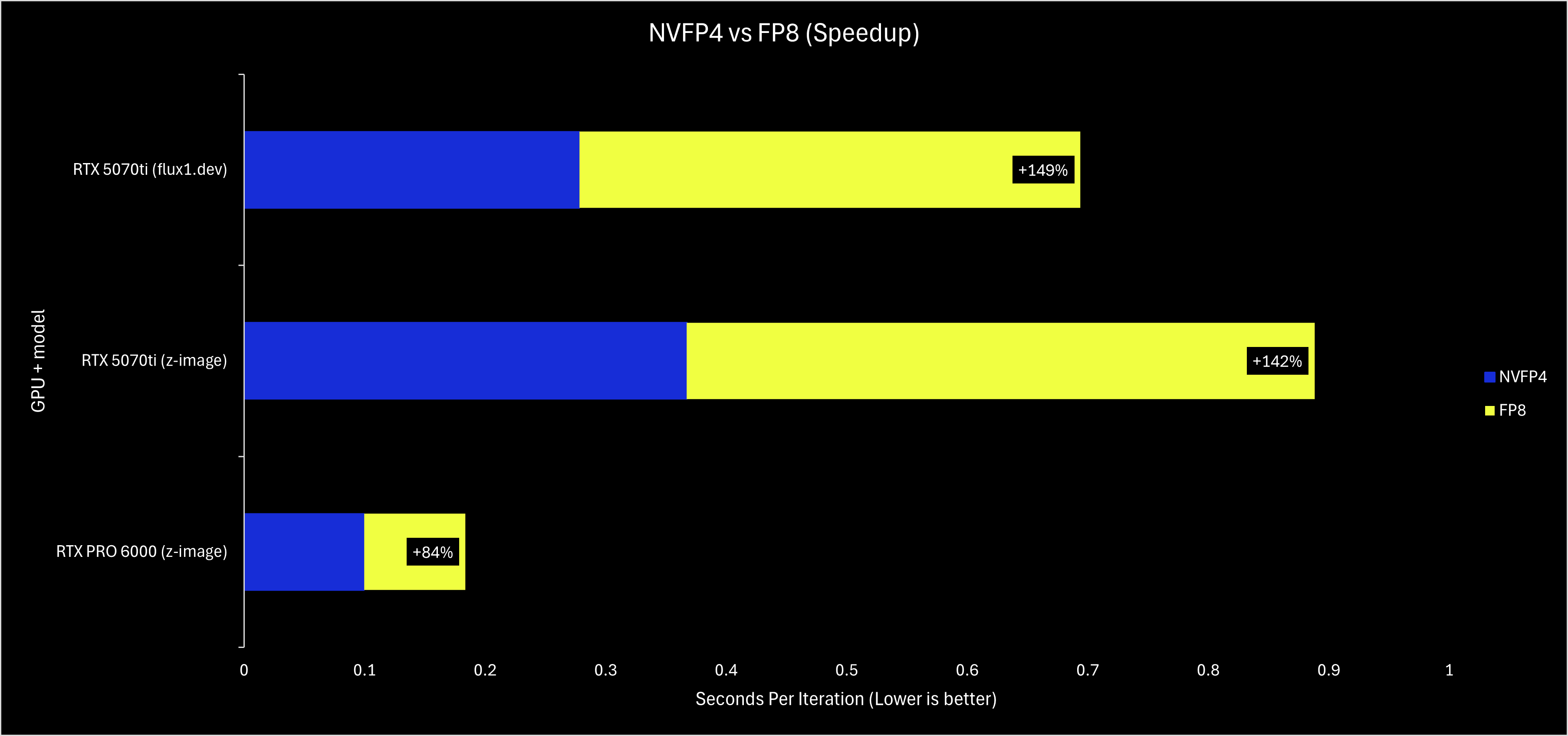
NVFP4 is a quantization format designed to make use of the FP4 hardware found on NVIDIA’s Blackwell architecture. When everything works correctly, RTX 50-series or Blackwell Pro GPU can get a ~2x performance boost compared to using fp8 or bf16/fp16 models.
An important caveat is that currently, ComfyUI only supports NVFP4 acceleration if you are running PyTorch built with CUDA 13.0 (cu130). Otherwise, while the model will still function, your sampling may actually be up to 2x slower than fp8. If you experience issues trying to get the full speed of NVFP4 models, checking your PyTorch version is the first thing you should try!
A 2x performance boost is quite the boast, so we have taken some benchmarks to show it off on a consumer RTX 5070ti and a workstation RTX PRO 6000.
Async Offloading and Pinned Memory (Enabled by Default for All NVIDIA GPUs)
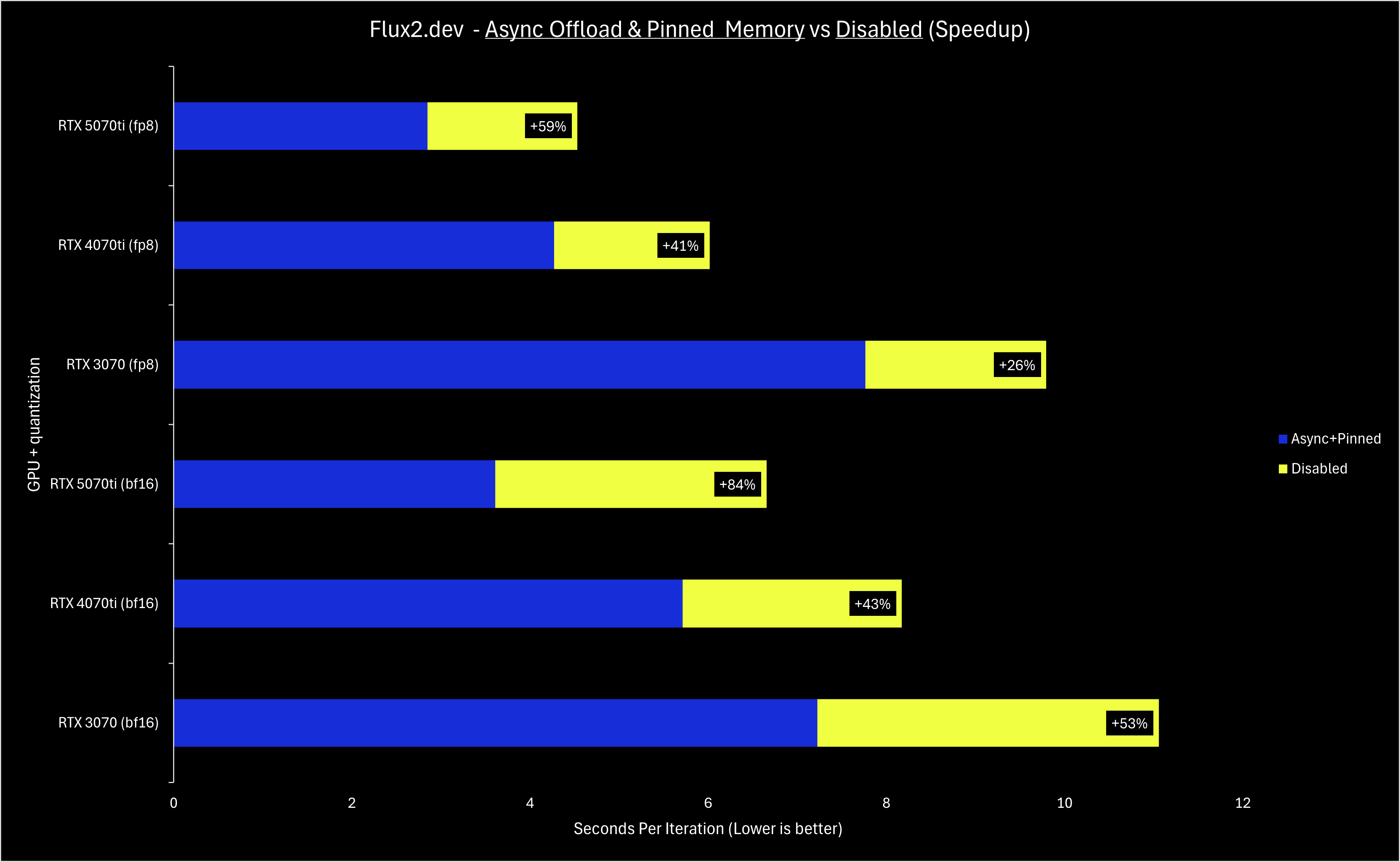
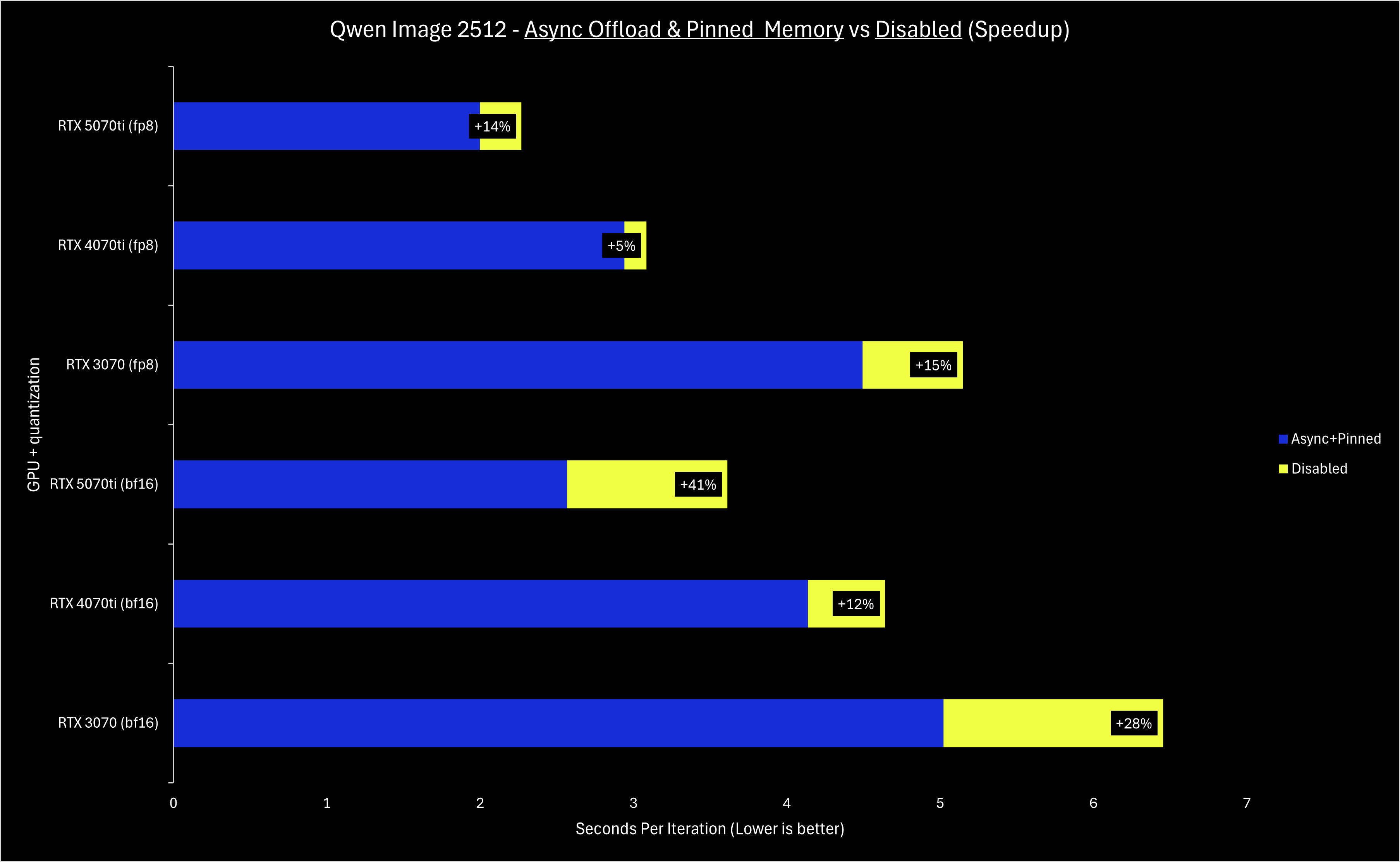
Unlike NVFP4, async offloading and pinned memory are broadly applicable to all NVIDIA GPUs, so they have been enabled by default in December. Depending on your hardware and the specific model used in a workflow, your sampling speed may have improved 10-50% compared to having these features disabled.
To sum up the tech details, async offloading and pinned memory make offloading weights have a smaller performance penalty than before - this means that in any scenario where a model’s weights cannot fully fit on the VRAM of a card, performance now should be improved. Note the implication: if you do not need to offload any weights to run a model, these optimizations will not improve your performance in a meaningful way.
Since the weights are streamed from your RAM to the memory on your GPU, your PCIe generation and lane count are directly correlated with the performance gains. The benchmarks in this blog post were all done on a PCIe 4.0 16x slot; when attempting to run with PCIe 4.0 8x, the performance improvements were less impressive. If your machine supports PCIe 5.0, you should see even greater performance gains!
The benchmarks below showcase 3 generations of NVIDIA GPUs - the RTX 3070 (8GB VRAM), RTX 4070ti (12GB VRAM), and RTX 5070ti (16GB VRAM). Top-end cards like the RTX 4090 and RTX 5090 benefit equally from these optimizations, but midrange cards need some love too.
Let us know if you’d like more technical and benchmark-focused posts like these - as we work on more optimizations, we will do our best to keep you informed. With RAM prices skyrocketing the past couple months, we are working on some RAM-usage optimizations that (with enough testing) we’d like to enable by default. Stay tuned, and visit our Discord if you’d like to help test!
Thank you for sharing these details and giving us visibility on the improvements made to ComfyUI under the hood. These low level optimizations help to sediment ComfyUI as a real production-grade tool.
Thank you for your constant improvement.
BUT Unhappily, it is likely fiddling with the programming at a basic level, especially when it affects different systems differently which leads to ComfyUI suddenly stopping running altogether.
This sudden type of crash is reported over and over at the ComfyUI org forum. And it has now affected me with a multi-factor bird's next of interwoven string to unravel.
If you are going to keep doing these "Improvements" please make their unintended side effects more easy to fix.